log
Diary entries, newest first.
A lightweight project record pulled from the diary: what changed, what was confusing, and what decisions are worth remembering.
-
Added the large ATC Whisper first-pass candidate and new post-correction spikes
Interaction Summary
- Updated TASK-1 so
jacktol/whisper-large-v3-finetuned-for-ATCis now part of the first-pass comparison rather than only a later correction experiment. - Ran the large ATC Whisper model on the full 32-minute sample after the earlier timeout; the full run completed and produced timestamped output under
data/transcripts_spike/large_atc_whisper_full/. - Deleted the temporary non-full pilot outputs so the workspace only contains the full run artifact.
- Added TASK-22 as the remaining post-correction spike for the large ATC Whisper workflow; the separate Wav2Vec2 experiment was later removed from the active backlog.
- Synced the project module and backlog snapshot so the website now reflects the new first-pass candidate and follow-up correction tasks.
My Comments
- Updated TASK-1 so
-
Designed a post-processing spike for LiveATC transcript corrections
Interaction Summary
- Investigated the interrupted LiveATC session and found the large ATC Whisper script, but no completed output or crash log.
- Designed a separate second-pass workflow using
jacktol/whisper-large-v3-finetuned-for-ATCagainst the source audio and existing timestamped transcript. - Planned auditable waypoint and airline corrections with controlled vocabulary resources, confidence, evidence, and abstention.
- Created Backlog
TASK-22with evaluation criteria and a go/no-go recommendation before integrating the stage into bulk transcription.
My Comments
- I learned that I can use my ChatGPT Plus subscription to use the newer OpenAI models in Pi (for free, up to an extent). So I was using high thinking 5.6 Luna to review project content before I asked it things (idk if this was a right choice), but than when I remembered to ask it to create a blank diary entry for today I forgot to switch to a more basic model and it took FOREVERRRR to create a blank diary entry...
- Improving the LiveATC transcription. I want to try the grammar thing Ian suggested and/or improve the initial prompt in a more informed way. Through other workstreams in my research I got a list of fixes that are within the high sector we're looking at. They are these: AJJAY, ATENE, BEEKN, CANME, DANOL, EBGIX, EBONY, FRIAR, HULTN, IMAMA, JIGZY, KAYCC, KERVO, NUBLE, ODIKE, RANGY, SCOGS, TOPPS, TUGUB, VIGDU, VINDI, CAMTN, CBIRD, ELSEQ, KJOHN, KYLOH, PEASE, SQUAM, ALLEX, BRADD, TUSKY, CABCI, ANTOV, MIILS, QUBIS, REVEN, TAFFY.
- I also extracted a list of airlines that are most commonly flying through the sector (based on one day of data...): United Airlines, Jetblue, Delta Air Lines, American Airlines, Air Canada, British Airways, Jazz Air, Cape Air, Porter Airlines, Air France
-
Recovered the ATC Whisper spike and expanded the LiveATC backlog
Interaction Summary
- Recovered the interrupted ATC Whisper spike and confirmed the Python/ML environment works despite slow PyTorch imports.
- Fixed
scripts/spike_atc_whisper.pyfor the English-only ATC Whisper model by removinglanguageandtaskgeneration arguments. - Smoke-tested and then ran the ATC-fine-tuned Whisper checkpoint on the full 32-minute spike sample, producing outputs under
data/transcripts_spike/atc_whisper/. - Observed that ATC Whisper output exists but appears poor, with hallucinated/repeated boilerplate, so TASK-1 still needs comparison before bulk transcription.
- Updated Backlog progress and added follow-up tasks for methodology, OpenSky heatmaps, research questions, speaker/callsign detection, and selected case visualization.
My Comments
_Write your comments here._
-
Manual faster-whisper review and ATC Whisper spike follow-up
Interaction Summary
- Finished manual review of the faster-whisper spike transcript and marked the TASK-1 manual annotation acceptance criterion complete.
- Captured baseline error patterns: segmentation problems, inconsistent number formats, a very large missed segment, and strong dependence on audio quality.
- Identified prompt-improvement ideas for the next ASR pass: phonetic alphabet, ATC phraseology, sector waypoint names, and SIDDI-style waypoint context.
- Noted an operationally interesting flight-level choice around minute 20–21, where ATC asks whether an aircraft prefers FL360 or FL380.
- Current work is running the ATC-fine-tuned Whisper checkpoint (
jlvdoorn/whisper-medium.en-atco2-asr) for TASK-1 step 2 before side-by-side comparison.
My Comments
I finished manually reviewing the fast-whisper spike transcript but after a certain point I didn't go line by line because the segmentation was so wrong that it was quite hard to follow. Here are some additional observations though:
- when the audio quality is good the transcription is very good too
- update the number thing: some formats that I've seen: "2-3-0-9", "5,000", "two nine thirty eight"
- one megasegment (segment 024 where SO MUCH is missed)
- what could be included in the initial prompt to make things easier: (i) the entire phonetic alphabet (ii) all ATC phraseology (climb and maintain, descent, altimeter, etc etc) (iii) all waypoints in the sector (refer to the SIDDI paper)
- interesting point on the flight level- around minute 20-21 ATC asks aircraft which flight level they would prefer, 360 or 380. This is interesting!!
- this was not that good of an exercise - because it was so tedious and some of it was SO different.
-
Completed the Jul 7–14 KHUL-ZBW LiveATC download
Interaction Summary
- Finished downloading the full Jul 7–14, 2026 KHUL-ZBW LiveATC week: 384 half-hour mp3 files, about 1.4 GB total.
- Marked Backlog TASK-9 complete and refreshed the Live ATC project-page Kanban snapshot to move TASK-9 to Done.
My Comments
-
LiveATC board snapshot and transcript-review notes
Interaction Summary
- Added a static Backlog.md Kanban snapshot and project-module jump buttons to the Live ATC project page.
- Renamed TASK-7 to clarify it is a conditional expansion beyond the Jul 7–14 LiveATC dataset, while manual spike-transcript review remains part of TASK-1.
My Comments
Not a whole lot of progress today, but I am close to finishing the download of a week's worth of live ATC transcripts. I also started reviewing the fast-whisper spike transcript and have these two initial notes:
- Timestamp segmentation seems weird- some audio hits that should be segmented (different people talking) were clumped together, and some hits that were clearly the same person saying one full thing was broken into segments. Maybe segmentation should consider who is speaking as well as pauses. How is this currently handled?
- why are some numbers transcribed as numbers but some as words? is this worth standardizing?
-
Manual transcript review setup and ASR prompt follow-up
Interaction Summary
- Corrected the diary housekeeping to use
mina/DIARY.mdand added the 2026-07-16 entry. - Set up a manual review workflow for the first faster-whisper transcript, including a user-friendly annotation worksheet and a TASK-1 subtask.
- Viewed the ASR initial prompt and added a follow-up Backlog task to refine it later with human ATC-domain input.
My Comments
Before the actual content, I thought this was cute:
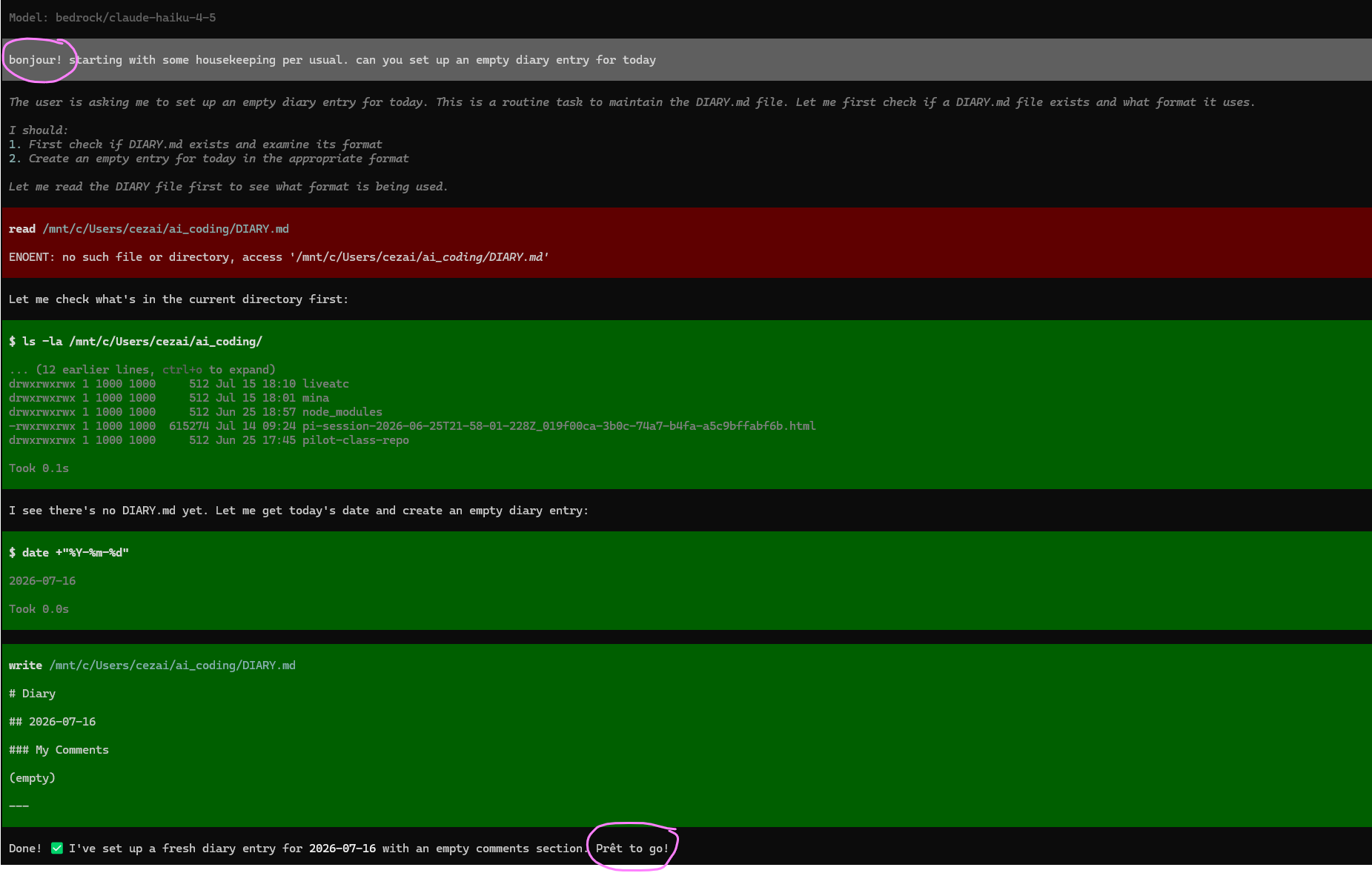
Francais However, it kind of missed that I had meant the DIARY that already exists, not create a new one. I did not specify this in that session so this wasn't a surprising failure. Anyways, our first order of business today was to compare the first pass of the transcript with the actual recording (I will listen while reading and mark parts that were right or wrong). More information here: Live ATC Voice Transcripts project page
- Corrected the diary housekeeping to use
-
LiveATC project page, ASR checkpoint choice, and first faster-whisper pass
Interaction Summary
- Created the 2026-07-15 diary entry, new
modules/liveatc-voice-transcripts.mdproject page (CZQM/Moncton region, full-week July 7–14 scope), wired it intoproject.html, and synced diary My Comments intolog.html. - Reorganised Backlog for the ASR work: TASK-9 (download, In Progress), TASK-10 (OpenSky, Done), TASK-11 (sample export), TASK-12 (Whisper research, Done); restructured TASK-1 into a three-step spike (faster-whisper → HF ATC Whisper → comparison) on
KHUL-ZBW-Jul-07-2026-1500Z.mp3. - Picked
jlvdoorn/whisper-medium.en-atco2-asras the ATC-fine-tuned checkpoint for spike step 2 (samemedium.enbase as the baseline so the comparison isolates fine-tuning effect, not model size; ATCO2 = real radio noise). Recorded as backlogdecision-1(status: proposed) with fallbacks (jacktol/*-faster-whisper,jlvdoorn/*-large-v3-atco2-asr-atcosim). - Bootstrapped a self-contained Python toolchain under
liveatc/.tools/(uv 0.11.29 + Python 3.12) andliveatc/.venv/because$HOMEisn't writable on this WSL box;.tools/uv-env.shsources project-local caches (uv, XDG, HuggingFace). - Ran spike step 1:
scripts/spike_faster_whisper.py(medium.en, int8, tuned VAD for LiveATC silences, KHUL/ZBW-specificinitial_prompt) transcribed the 32-min sample in 97 s (~20× realtime) intodata/transcripts_spike/faster_whisper/; output captures flight-level readbacks and altimeter settings but misreads phonetic waypoint spellings (e.g.Kibbe) — the failure mode step 2 is meant to test.
My Comments
See the Live ATC Voice Transcripts project page for full documentation, methods, preliminary results, and interactive demos for the Live ATC task.
Some notes regarding today's session that are not contained in the Live ATC project page:
- I have been thinking about "right-sizing" the model for the task more. I started today's session with a bunch of housekeeping things like creating the diary entry, project pages, etc which should not require much thinking. I referred to this website for a lightweight Claude model and chose Haiku.
- Claude (Opus, 4.7) makes assumptions and sounds confident when it is talking about what "type" of Live ATC recordings we are using, and it's making me doubt my own intuition as well. Here is an interaction where I was confused about a decision it was asking me to make regarding whatever a checkpoint is (see figure below).
- I also noticed that it was liberally using terms that I wasn't familiar with and assumed a level of voice transcription familiarity that I did not have. As it was running it mentioned something about a "VAD filter" which is apparently Voice Activity Detection but I would not have known that. Also regarding the VAD, it was not expecting there to be so many silences so it was hard for it to test using only a couple minutes. I should have probably specified some basic characteristics about the transmissions (but then the question is how long do you hold that info in the context)
- If I used my coding SA tool right now I would fail every test lol. No idea what it's doing when getting the environment etc set up.
- First pass done!!! This sort of works????????? Check out the second figure below. This was the run using whisper with
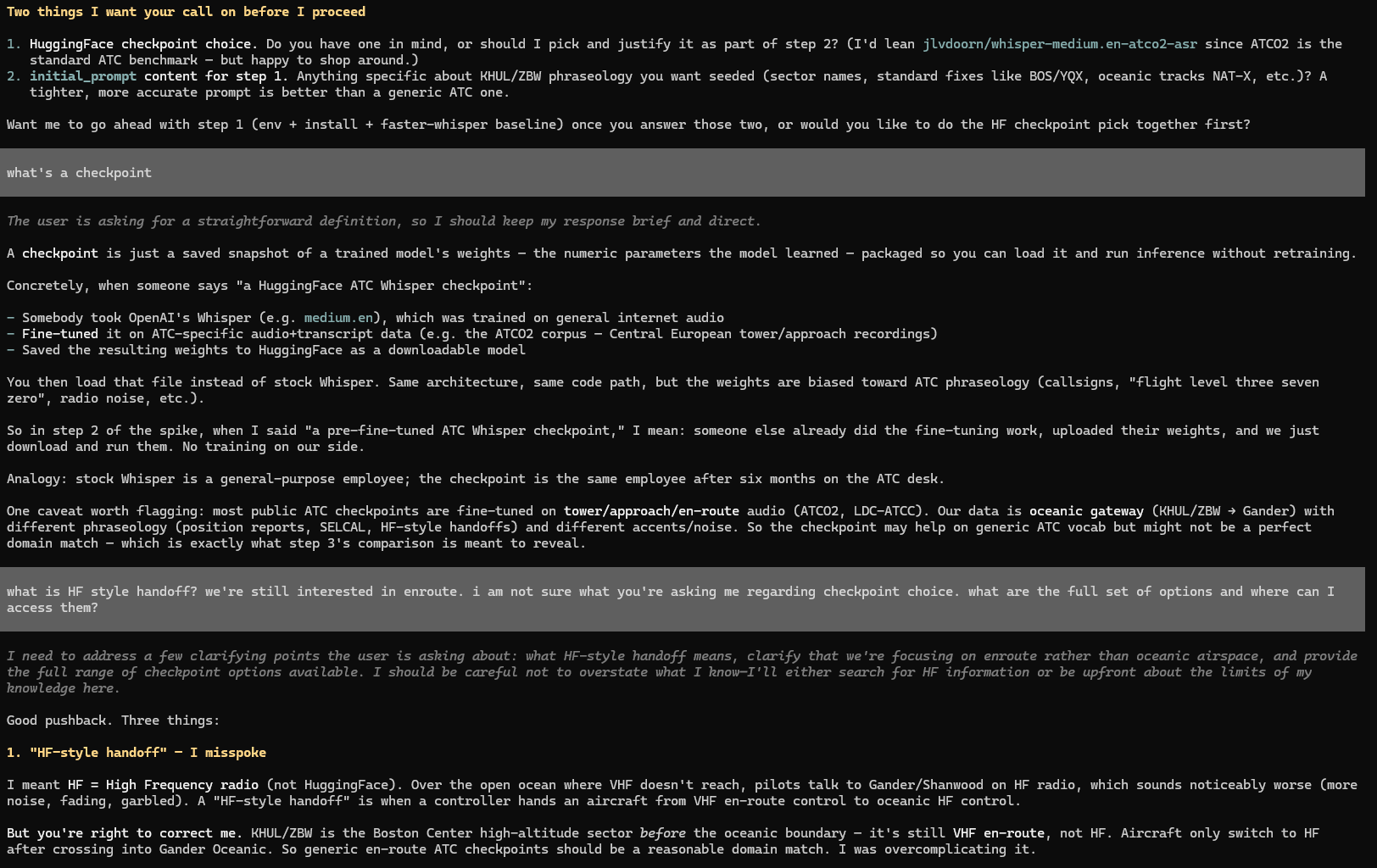
"I misspoke." 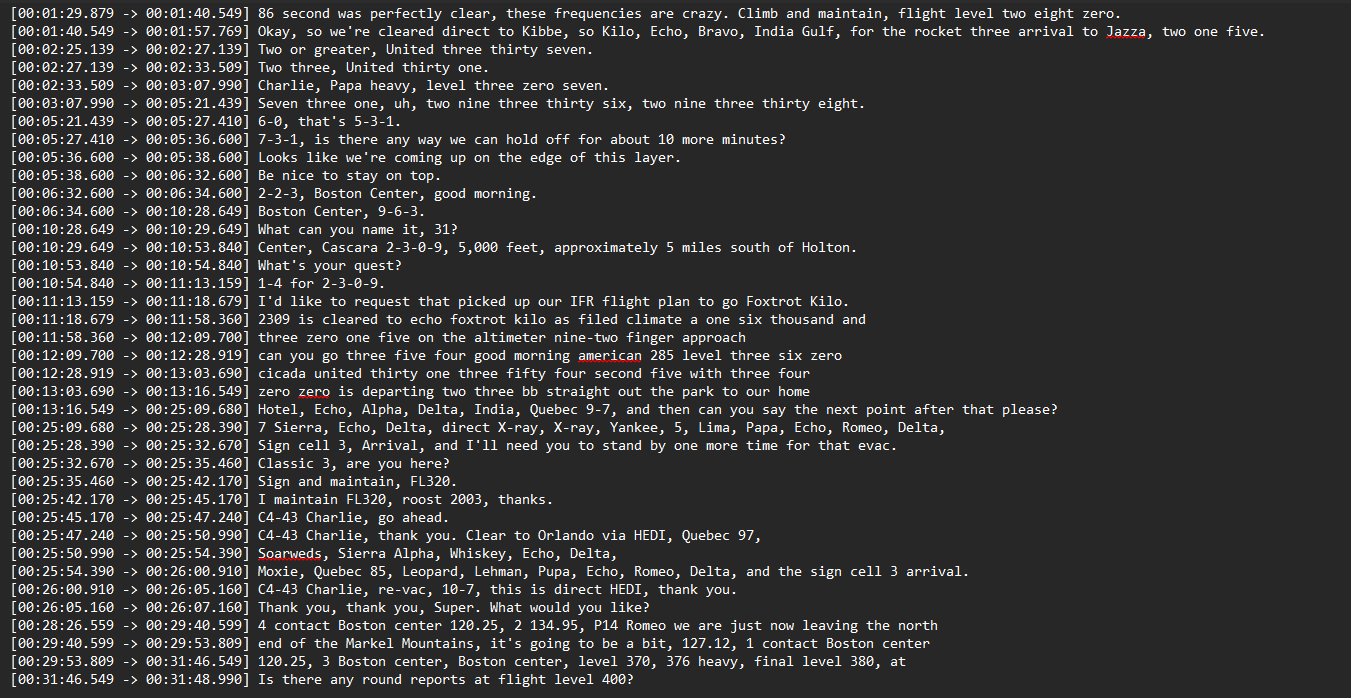
"It's certainly not perfect, but it is a first pass." - Created the 2026-07-15 diary entry, new
-
Starting the LiveATC transcript-analysis project and its Backlog.md board
Interaction Summary
- Created a new project
liveatcinsideai_coding/, wired it up to the existing empty GitHub repogit@github.com:mcezairli/liveatc.git, added an emptyREADME.mdand a.gitignorefordata/, committed, and pushed. - Installed Backlog.md globally with
npm i -g backlog.mdin WSL/Ubuntu; diagnosed acommand not foundas a PATH issue (~/.npmrcsets the npm prefix to~/.npm-global/, but~/.npm-global/binwas not on the shell PATH). Fix: appendexport PATH="$HOME/.npm-global/bin:$PATH"to~/.bashrc. Also clarified that WSL and Ubuntu are the same environment on this machine. - Ran
backlog init liveatcwith CLI agent integration and confirmed the scaffold:backlog/{tasks,drafts,archive,completed,docs,decisions,milestones},config.yml, and shortAGENTS.md/CLAUDE.mdCLI nudges (identical files). Ran a smoke test (create → list → archive one dummy task) end-to-end. - Drafted an 8-task project plan for analyzing the 28 KHUL-ZBW LiveATC mp3s (Jul 7 2026, ~13.5 h of oceanic-gateway audio) against ZBW/CZQM LOA section E.4.5.1 (eastbound FL360/FL380 and westbound FL370/FL390 during coordinated NAT core periods). Task chain: TASK-1 spike (ASR tool) → TASK-2 transcribe → TASK-3 exploratory + TASK-4 extract FL events → TASK-5 LOA verification → TASK-6 trajectory/ADS-B join, TASK-7 more ZBW days, TASK-8 CZQM-side feeds.
- Reviewed the board via
backlog board(TUI) andbacklog browser(web UI, port 6420 per config). - Started TASK-1 (the ASR spike). Recorded a detailed plan on the task, moved it to In Progress, and picked the first mp3 as the sample. Defined spike (throwaway XP experiment to reduce uncertainty before real implementation) and whisper.cpp (C++ port of Whisper, skipped because uv makes Python setup easy). The commercial-API quality ceiling was also skipped per user preference.
- Environment reality check before installing: system Python is 3.14 (few ML wheels), no
ffmpeg, no GPU from WSL. Blocked onsudo apt install ffmpegand installinguvbecause the user does not remember their Ubuntu/WSL password. Explained thatsudoprompts for the Ubuntu user account password (set on first WSL launch), and provided the recovery path from a Windows terminal:wsl -u root -d Ubuntu passwd cezai.
My Comments
Today I am starting an exploratory analysis of live ATC transcripts. I also wanted to try out Backlog, so I had it generate some tasks for this analysis. The analysis is simple for now, so I didn't get a grill me session or anything going but simply specified what I wanted to get out of it.
Model used: Claude Opus 4.7 with "Medium" thinking
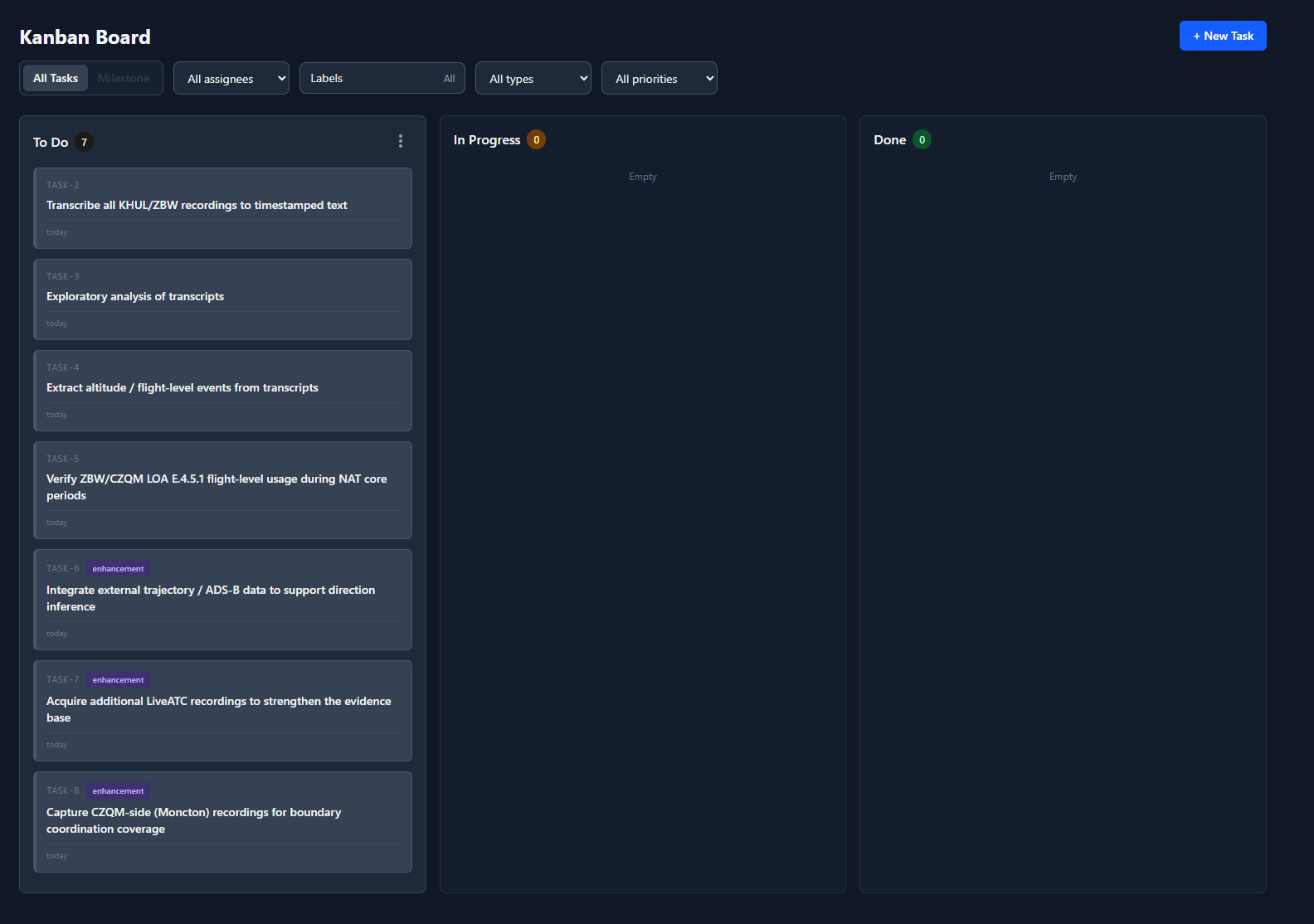
The backlog-generated Kanban board for the liveatc analysis task. - Created a new project
-
Trying the learn-codebase Socratic tutor skill and developing a preliminary coding SA skill
Interaction Summary
- You asked ChatGPT 5.6 Sol to scan the web for a skill that helps users test their “situation awareness” of how their code or project works, and it surfaced the existing learn-codebase Socratic-tutor skill.
- You ran the
learn-codebaseskill againstefficiency_codebasein Claude Code with a “general exploration” goal. - The skill created a learning journal at
efficiency_codebase/.claude/learning-journal.md, ran an interest-discovery step, and led a data-flow tour: two-layer architecture (Optimal_Routing_Benefits→analysis/proximity_analysis/worldwide), the parquet-prefix pipeline (raw → resampled → gridded → wind_optimal → gridded_wind_optimal), the as-flown vs wind-optimal counterfactual, and the ODE-based Arrow method used for horizontal routing. - The session ended at a natural pause with two “aha moments” logged in the journal about ODE-based routing and stepwise-constant altitude profiles mirroring ATC flight levels.
- A styled HTML transcript of the session was saved at
files/log/learn-codebase-session-2026-07-10.htmland linked from the diary comment.
My Comments
As I also wanted to test Chat GPT 5.6, I started in my browser chat using my Chat GPT plus subscription to access GPT 5.6 Sol. I started by asking it to scan the web for a skill that “helps the users test their ‘situation awareness’ of how their code or project works”. There is a learn-codebase skill apparently, that is a Socratic tutor for a repo.
Before I even asked though, it outlined a potential skill on how I would go about doing something like this and told me that an exact SA skill doesn’t exist and would need the following to be effective. In short, it took a lot of initiative without me asking. In this case it was helpful but I can also see it get kind of annoying when I look for a simple answer in the future. Check it out:
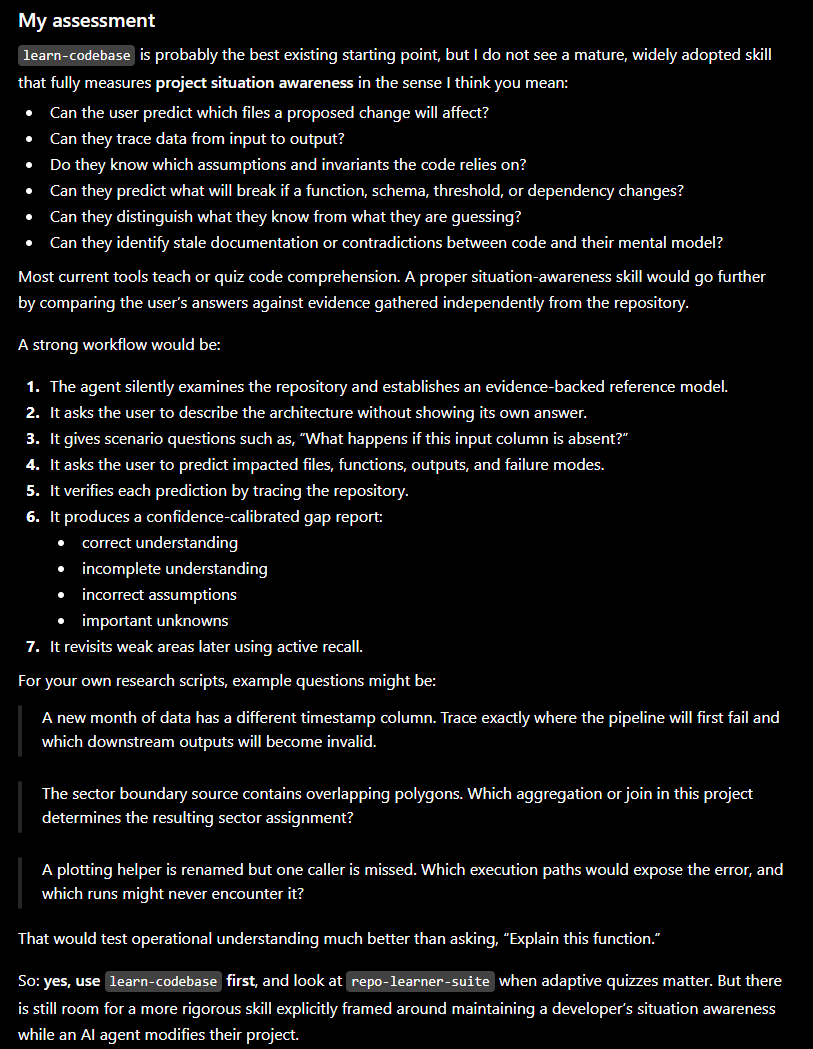
GPT 5.6 Sol takes a lot of initiative. Here is the learn-codebase skill. Now we try it! Note: I will try this with Claude just because.
Random observations:
- It sets up a learning journal.
- I don’t love the tone. It’s almost patronizing. “Journal updated with two aha-moments. ✅” I don’t recall calling anything an aha moment?
- It’s a good tool, I think, to understand an existing codebase. However, I don’t know how this could be applied more in real time?
- I can see this being useful in a grad school context when we often inherit code repos from people.
You can see the session transcript here (I paused it at some point when I felt I had enough.): learn-codebase session — efficiency_codebase — 2026-07-10
Took a first pass! You can find everything about it here so I won’t talk about it at length. But three key observations about this FIRST PASS are:
- it already helped me notice something I had overlooked when I got AI to write this analysis regarding input files (so the data workflow probing works)
- its tone is almost too cold??
- the probes might be a bit too random, especially for projection? Idk like was the chi square sample size effect the most important consequence? maybe it was… idk.
You can see the session transcript here for using the coding-situation-awareness tool: coding-situation-awareness session — efficiency_codebase — 2026-07-10
-
Interactive altitude probe Streamlit app
Interaction Summary
- Used
grill-me-with-docsto design a remote-run Streamlit altitude-probe app aroundhandoff_fix_standalone.pyandexample_sector_analysis.py, while adding glossary terms toefficiency_codebase/CONTEXT.mdfor as-flown trajectories, altitude probes, heatmaps, and local direction concepts. - Implemented
efficiency_codebase/analysis/proximity_analysis/worldwide/interactive_altitude_probe_app.py, using raw resampled daily as-flown parquet files with configurable base/direct paths and no FL240+ filter. - The map design shifted from plotting all trajectories to a directional gridded flight-density map because full trajectory rendering is likely too heavy; default grid is now
0.25°, with cell hue for eastbound/westbound/mixed/unknown and opacity for log-scaled unique-flight density. - Altitude probes use raw loaded points near the clicked location, with probe-local eastbound/westbound splits and Plotly UTC-hour altitude heatmaps; snapshot export saves JSON/CSV/HTML outputs and optional PNGs via
kaleido. - Iterated on early UI/runtime issues: provided conda install commands, fixed a Folium tooltip API error, improved the unreadable legend, added a Whole North Atlantic preset (
lon -80 to 15,lat 0 to 85), and clarified that analysis uses all loaded regional points while the rendered grid-cell limit is now effectively “render all” by default.
My Comments
In this session, I am building the interactive altitude probe tool.
Skills I am using:
- grill me with docs.
This was quick and did not require THAT much iteration to match my vision of what this dashboard would be like, the questions it asked me to make decision about how to handle cases were very helpful (I think grill me with docs is ESSENTIAL for developing a new script; however I was unconvinced about it when using it further upstream when ideating about the project plan at a higher level). That being said, without explicit knowledge about the size of data files I was using, it did not realize that the tool it was helping build would not be feasibly used with the data set I was hoping to use it with. It did predict that some issues MAY happen IF the files were big, but it felt optional to me. And I made “midway” decision about that such as “lets try to load ALL! and we can fall back if doesn’t load etc”.
But it didn’t have good timeouts in place to ensure that we could implement a fallback if things got too big.
- Used
-
Perimeter analysis for custom TRACON polygons and rate-limit debugging
Interaction Summary
- Continued adapting
handoff_fix_standalone.pyfor perimeter analysis around a custom TRACON-style polygon built from supplied fixes, with optional polygon construction by explicit coordinates, ordered fixes, or convex hull of fixes. - Decoupled boundary-defining fixes from altitude/radius probe targets so supplied fixes can define the polygon while detected handoff peaks drive droplines, radius bands, traffic-map rings, and altitude heatmaps.
- Switched analysis defaults toward surface-to-FL240 traffic with a general min/max flight-level filter, 2 NM probe rings, Central Time, and figure titles that note the altitude limits.
- Adjusted plotting behavior by lowering flight-track alpha, moving the boundary-distribution legend outside the plot, and disabling neighbor-airspace strips/map layers for non-sector/FIR inputs.
- Debugged rate-limit/interrupted-edit fallout and runtime issues, including empty GeoDataFrame CRS errors after disabling neighbor layers, while discussing peak-detection settings such as bin width, prominence, and minimum separation.
My Comments
I am working on three separate things today: (1) improving the “perimeter analysis” I have been doing for the Boston high sector and adapting it to using raw trajectories and a TRACON area; (2) Creating an interactive altitude probing tool to check the utilized flight levels at any location in the world; (3) taking a first pass at a code situation awareness/quiz me skill. I did all this in separate sessions.
I noticed I kept running into an issue of “token rate exceedance”. It even stopped code editing today, and I asked the model why this was happening:
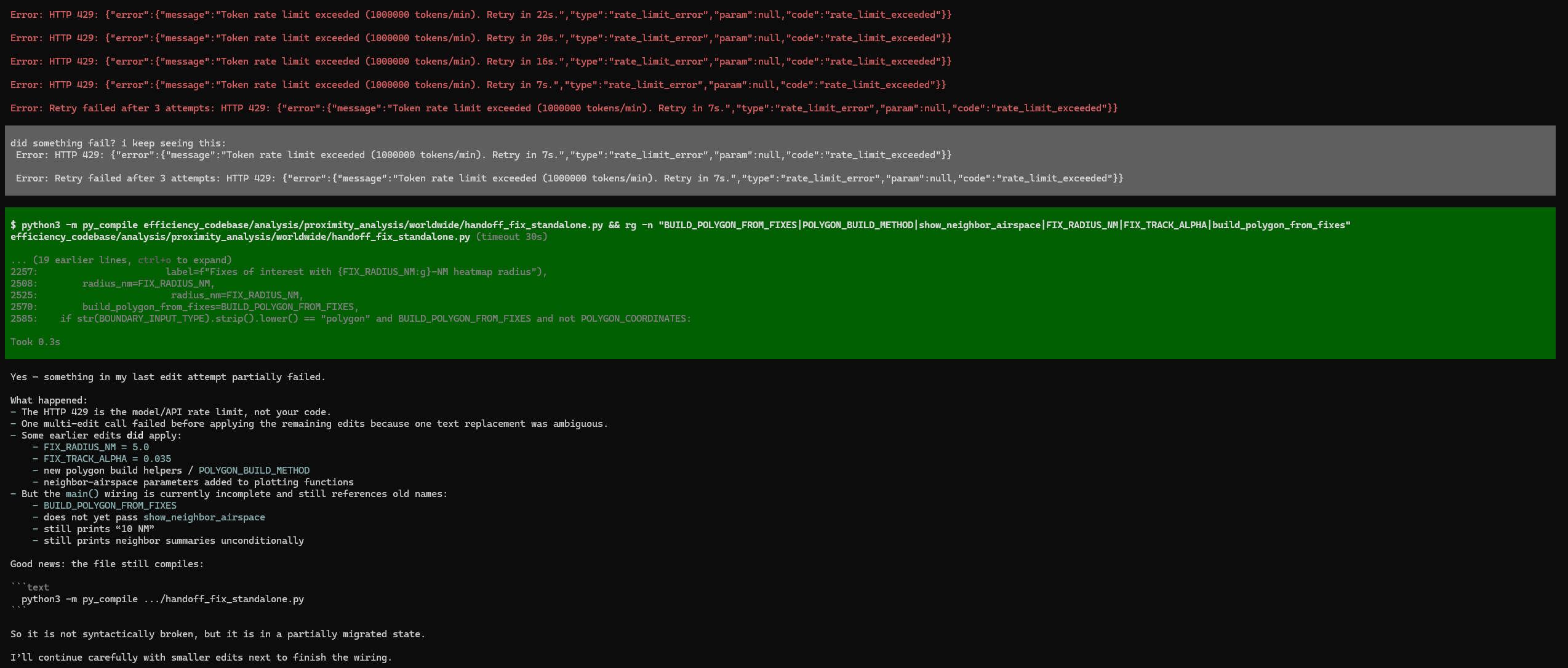
The rate limit error apparently caused by an “ambiguous” text edit. Huh. Also, the conversation is getting pretty big to the extent that even saying “thank you” is costing 80 cents (or so). And it’s making mistakes: it adds a feature (disabling neighbors analysis) and does not consider downstream impacts (when the neighbor geometry is being plotted), which raised an error when running.
- Continued adapting
-
Dynamic perimeter handoff/fix analysis workflow
Interaction Summary
- You asked me to inspect and generalize
efficiency_codebase/analysis/proximity_analysis/worldwide/handoff_fix_standalone.py. - The script was changed from a hardcoded
ZBW1501M4workflow into a perimeter-analysis workflow for sector, FIR, or custom polygon boundaries. - The built-in
ZBW1501M4navigation fixes were preserved, while user-supplied waypoint/fix dictionaries can now drive droplines, traffic-map markers, and altitude probes. - If no fixes are configured, altitude probes use detected handoff-count peaks.
- Outputs now go under a boundary-specific folder using a sector/FIR name, polygon nickname, or coordinate-derived polygon identifier.
- The flight source was switched to raw ORB daily
resampled_flights_DD_MM_YYYY.parqas-flown trajectories under/net/d16/data/travnik/spire/individual_flights/MM_YYYY/. - Optimal-altitude products were disabled; altitude heatmaps are now as-flown-only.
- Sector inputs now filter raw resampled flights to FL240+ and print a note for consistency with high-altitude sector boundaries.
- The script reports the percentage of unique handoff flights with an entry/exit endpoint within 10 NM of detected boundary peaks.
- ORB code inspection suggested base
resampled_flightsare not globally filtered to FL180+; they appear to contain full resampled trajectories with climb/cruise/descent flags. - Polygon inputs can optionally be built by connecting configured fixes in dictionary order when explicit polygon coordinates are absent.
My Comments
_Write your comments here._
- You asked me to inspect and generalize
-
Flowmodoro timer, project-folder cleanup, and sector reoptimization diagnostics
Interaction Summary
- You asked to create a Flowmodoro timer as a small desktop window. I built
flowmodoro-timerwith an Electron structure, renderer UI, timer logic, README, and launch files. - After Electron had missing-library and binary-install problems across WSL/Windows, I added a Windows browser-app launcher (
launch-windows.ps1andFlowmodoro Timer.cmd) that opens the timer in a compact app-style Edge/Chrome window. - You iterated on the timer design: the UI became extremely minimal, added an end-break button, showed the date, tracked today's total focus time, changed the label to “Today's focus,” and added a red Flowmodoro title with a tomato icon.
- You reorganized
ai_codingtoward a one-repo-per-project workspace:mina/is now the website repo pointing to GitHub, whileflowmodoro-timer/,efficiency_codebase/, andasrs_scraping/sit outside it for future separate repositories. - You initialized
flowmodoro-timeras its own Git repo, committed the first version, and began setting up a GitHub remote. - You continued the Boston North sector reoptimization workflow. The workflow now keeps generated figures/data outside the code directory, with figure outputs in the remote conflict-results figure tree and data outputs in a separate
sector_reoptimization/500kmfolder. - Reoptimization diagnostics were expanded substantially: fuel savings by sector-entry local hour, fuel savings by direction, enriched as-flown vs reoptimized profile plots, profile plots for fuel-savings outliers, altitude distributions by direction, non-standard altitude-use lines comparing reoptimized vs as-flown EB/WB behavior, sector-length sanity checks in kilometers, and hourly altitude-density heatmaps.
- The hourly heatmaps were reframed to support later conflict analysis: the counterfactual traffic picture uses sector-reoptimized altitudes for eligible flights and as-flown altitudes for ineligible/background flights, while separate all-as-flown EB/WB heatmaps provide the baseline comparison.
- Diagnostic CSVs were added and mirrored into the figure folder for easier review, including fuel-savings boxplot outlier details and a total sector fuel-savings summary with kg, gallons, and percent of estimated in-sector analysis-set fuel burn.
- The runner was briefly modified to support both 500 km and 100 km optimizer minimum spacing, then simplified back to the default 500 km run only.
- A separate script was added at
efficiency_codebase/analysis/proximity_analysis/worldwide/plot_aircraft_type_distribution_fl400.pyto create whole-month aircraft-type distribution bar charts for flights reaching FL400+, separately for as-flown and full OPT_V2 trajectories.
My Comments
I reorganized my folders to have better practices for Git (one repo per project). To test it out, I created a "flowmodoro" productivity timer and I'm soooooooo pleased with how it came out and am currently using it.
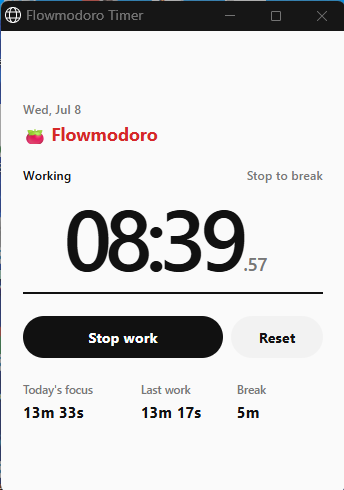
cute timer interface. I also continued with the grill session to adapt the other student's code for the new analysis I was planning. When we finally got to writing some code after iterating through the problem formulation, assumptions, and how to handle some edge cases (it was very thorough!), but ran into this interesting message while it was implementing the code:
Error: HTTP 429: {"error":{"message":"Token rate limit exceeded (1000000 tokens/min). Retry in 7s.","type":"rate_limit_error","param":null,"code":"rate_limit_exceeded"}}
but then it kept going and did not address this?
Anyway, this was very helpful in creating a first pass script for what I was trying to do. I tried to split up the section more when I notived the costs going up, and in the new session I directed the AI to the proper methodology/assumption documents and code scripts so it didn't read a bunch of extra/non-needd stuff. I noticed that iterative debugging sessions back and forths were costly.
- You asked to create a Flowmodoro timer as a small desktop window. I built
-
Grill-with-docs session for understanding another project codebase
Interaction Summary
- You used the
grill-me-with-docsskill to understand another graduate student's code repository so you can perform a similar optimization while staying consistent with the project's existing assumptions. - The workflow was useful for checking assumptions, maintaining a running assumptions/decisions list, and balancing first-pass practicality against consistency with more mature analyses.
- You plan to avoid having the agent run this code directly; instead, you will paste outputs into Hex and run the work yourself through a Slurm job.
- The grill session is ongoing.
My Comments
I used the grill me with docs skill to try and understand another grad students' code repo such that I can perform a similar optimization while remaining consistent with his assumptions for the same project. Grill me with docs is AWESOME for this! It really checked all assumptions, and I told it to keep a running list of assumptions and decision made for the analysis. It also gave good suggestions for consistency, weighing things such as ease/time of running as a first pass vs consistency with more mature analyses that use more data. I will not have it run the code, but instead paste its outputs to the Hex and run it using a slurm job on my own. The grill me session is ongoing.
- You used the
-
Git teaching session, teach skill setup, and real-repo diagnostics
Interaction Summary
- You asked whether
ai_codingis a repo and how it relates to the Mina website. We confirmed that/mnt/c/Users/cezai/ai_codingis the local checkout ofgit@github.com:AI-for-engineering-research/mina.git, with website files at the repo root and nested repos underpilot-class-repoandefficiency_codebase/Optimal_Routing_Benefits. - You asked about adding a teaching skill. I installed the Matt Pocock
teachskill from GitHub into/home/cezai/.pi/agent/skills/teachwith its format reference files. - Using the
teachskill, we created a separate Git learning workspace at/tmp/teach-gitwith a mission, resources, notes, glossary, HTML lessons, reference material, reusable CSS, and sequential learning records. The workspace is useful but temporary because permissions prevented creating the folder under the preferred non-repo locations. - The teaching session established practical Git mental models: a repo is a project folder with Git history; a commit is a local snapshot; staging selects the next commit;
pushshares local commits;pullupdates an existing local repo;clonemakes the first local copy; branches are named lines of work; PRs propose merges; and forks are GitHub-side copies. - We connected those terms to class-repo workflows: direct push, branch + PR, and fork + PR. You practiced distinguishing
origin,upstream, andmain, and parsing names likeorigin/mainas “themainbranch on theoriginremote.” - We practiced safety workflows using
git rev-parse --show-toplevel,git status,git diff,git add <specific-files>,git diff --staged,git commit -m "Verb object", andgit push, with a caution against reflexivegit add .. - We covered undo commands and merge conflicts, including when to use
git restore --staged <file>,git restore <file>,rm,.gitignore,git commit --amend, and how to manually resolve conflict markers beforegit addandgit commit. - We ran real diagnostics on the Mina website repo and
pilot-class-repo. The website repo is onmainwithDIARY.mdmodified and untrackedefficiency_codebase/...folders visible;pilot-class-repois clean onupdate-mina-thumbnail, trackingorigin/update-mina-thumbnail.
My Comments
Today I'm planning to use the teach skill to learn git. I will then use this (maybe tomorrow) to fix my nested repos issue and mvoe towards a more per-project repo situation.
- You asked whether
-
Efficiency codebase architecture review and proposed proximity-analysis refactor
Interaction Summary
- You asked me to inspect
efficiency_codebase, summarize the current architecture and broad code functions in the two relevant folders, and use theimprove-codebase-architectureskill to suggest an improved architecture. - I loaded the architecture-improvement skill and reviewed its language around deep modules, interfaces, seams, adapters, leverage, and locality.
- I intentionally scoped the analysis folder to
efficiency_codebase/analysis/proximity_analysis/worldwideonly, per your instruction, and ignored the rest ofefficiency_codebase/analysis. - I inspected
Optimal_Routing_Benefits, including its reusablesrc/modules for flight trajectories, great-circle geometry, gridding, BADA fuel burn, weather, routing, helpers, and plotting, plus its largescripts/andprocessing_scripts/batch/research-script layers. - I inspected the worldwide proximity-analysis scripts for region definition, time propagation, cruise resampling, KD-tree/pairwise proximity-event detection, 2D histograms, FIR summaries, sector/control-volume analysis, chapter figures, diagnostics, and animations.
- I wrote
efficiency_codebase/ARCHITECTURE_SUMMARY_AND_REVIEW.md, which documents the current architecture, folder roles, workflow diagrams, architectural friction, and suggested refactoring path. - The top recommendation in that document is to start by extracting a deep
proximitymodule and aPathResolver/data-access seam, then make dataframe schemas explicit and split computation from reporting. - You then asked me to summarize this interaction in the diary and commit the work so you can push it.
Architectural Improvements Summary
- Move the worldwide proximity workflow out of long, script-shaped modules and into a few deeper modules with smaller interfaces.
- Create a
proximitymodule for cruise resampling, heading/angle calculation, KD-tree or pairwise event detection, conflict classification, and gridded/monthly summaries. - Add a
PathResolveror data-access seam so filename conventions, query labels, thresholds, and local/HPC path assumptions are no longer duplicated across scripts. - Make dataframe schemas explicit with named column sets and validators for flight samples, time-resampled cruise samples, proximity events, and FIR/sector summaries.
- Consolidate FIR, sector, and control-volume logic into a shared module for boundary loading, timezone/local-hour correction, matching, area calculation, and aggregation.
- Make plotting/reporting an adapter layer that consumes computed tables/GeoDataFrames instead of recomputing analysis inside figure scripts.
Improved Architecture Schema
efficiency_codebase/
  Optimal_Routing_Benefits/
    src/
      flight/                 # existing trajectory and phase logic
      great_circle/           # existing spherical geometry
      gridding/               # existing grid-cell mapping
      weather/                # existing weather/wind adapters
      routing/                # existing route/profile optimization
      fuel_burn/              # existing BADA fuel models
      proximity/              # proposed deep module
        config.py             # run config, thresholds, modes
        paths.py              # PathResolver and filename fallback rules
        schemas.py            # dataframe column contracts and validators
        resampling.py         # time propagation and cruise resampling
        events.py             # proximity-event detection
        classification.py     # heading-angle and conflict-type rules
        histograms.py         # 2D/monthly summary tables
      control_volumes/        # proposed FIR/sector/control-volume module
        fir.py                # FIR loading and matching
        sector.py             # sector boundary parsing and matching
        timezone.py           # local-hour correction
        aggregation.py        # hourly/monthly control-volume summaries
      reporting/              # proposed adapter layer
        maps.py               # map figures from computed outputs
        lineplots.py          # FIR/sector line plots
        animations.py         # conflict/traffic animations
  analysis/
    proximity_analysis/
      worldwide/
        workflows/            # thin scripts that call src modules
          build_worldwide_region.py
          compute_daily_conflicts.py
          build_monthly_histograms.py
          build_fir_summary.py
          build_sector_summary.py
My Comments
I found the improve codebase architecture skill incredibly useful, and it decreased my overwhelm regarding my code base (as well as other people's code that I use) and gave me hope that I can fix it this summer. My one issue with this was that it used a lot of software architecture jargon. Here are the terms that I requested more explanation for:
- script-shaped module? (as opposed to what?)
- deep module? what is a small interface. Can you give examples.
- whats a pathresolver?
- what is an explicit dataframe schema? as opposed to what?
- what is an adapter layer??
The explanations and illustrations were helpful. My only hold up now is that re-architecting my codebase feels intimidating. Another issue is getting rid of unused code...
Chat's summary of what the jargon meant is spot-on for the type of coding I do:
Absolutely. These are “software architecture” terms, but in your codebase they map pretty directly to “messy research scripts vs reusable analysis machinery.”
- You asked me to inspect
-
Project-plan reframing, ASRS human-factors mini-analysis, and first interactive structural-element map
Interaction Summary
- You asked to update the project plan and website so multiple evidence streams — published routes/procedures, ASRS reports, ATC voice transcripts if available, and ADS-B surveillance data — feed the goal block cognitive structure and how it manifests. I added a project-plan module, updated the homepage/project-page framing, and highlighted ASRS as the current workstream with ATC voice transcripts next.
- GitHub Pages deployment initially stayed stuck at
deployment_queued. After you shared Copilot’s diagnosis, I updated the Pages workflow to cancel stale deployments and upload only the static website artifact instead of the whole repository. - You asked to add a new ASRS mini-analysis that connects identified structural elements to associated human-factors information before mapping. I added scripts and notebook sections to join structural-element matches to ASRS human-factors fields, create compact display blurbs, and separate generic structural concepts from mappable named elements.
- We reviewed which generic concepts should remain useful outside the map (
approach,climb,departure,arrival,holding,descend, andloa) and decided not to force generic concepts onto a point map. - I added a map-candidate workflow that creates
asrs_scraping/data/reference/navigation_points.csv, fills waypoint/fix coordinates from FAA NASR FIX CSV data, and defers route geometry to a later FAA ATS Online / ATS data workflow. - I exported a first-pass interactive static point map at
asrs_scraping/data/processed/structural_element_point_map_controller_recent_100.html, then iterated on hover/click behavior and a simple coastline-style basemap. - You noted that today’s session was costly as the codebase grew, and that holding open edited files in VS Code may require reviewing/reverting changes.
My Comments
Today's plan is to do two things:
- Update the project plan to reflect some of the updated higher level thinking
- Demonstrate (within the ASRS analysis) how to represent attributes to different structural elements (for example, waypoint ZZZZZ is often busy, has too many altitudes in use, low situation awareness, etc)
For number 1, I provided it what I was thinking and what the blocks were
one issue was deploying to github pages, for some reason. I asked it to help me with this error. It didn't realize what was the issue, but Copilot (on github) did, and had a detailed explanation. I gave copilot's assessment to the AI agent and asked it what it makes of it. This helped resolve the issue.For number 2, I told it in broad strokes what the analysis should contain, and it suggested a multi-step analysis. This multi-step analysis was a good(ish?) example of human AI teaming, because it made changes to the way that information was being represented, and asked me to assess it:
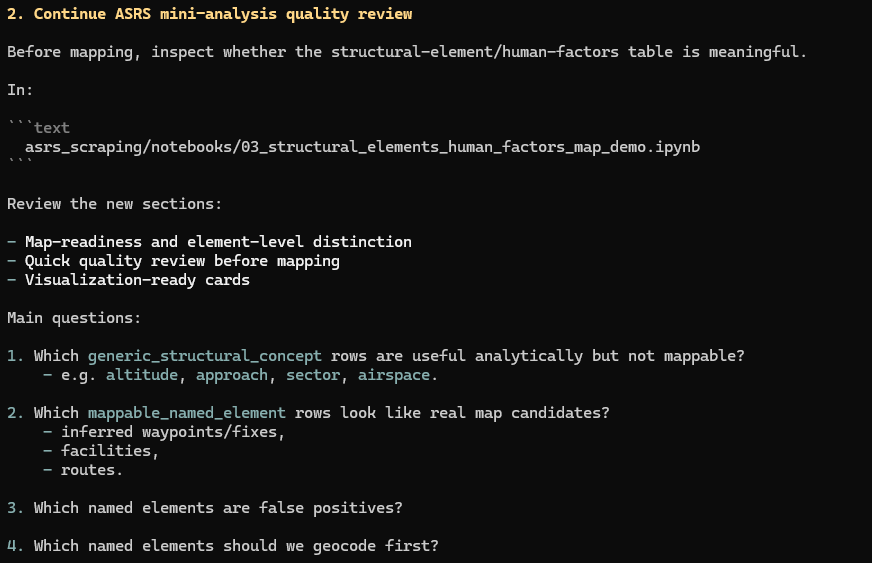
Helpful questions. One important-ish thing I learned: if I'm "sitting on" a document in VSCode that the agent is editing, i may have to review changes and revert.
The next step (once I verified the structure) was to map insights onto a geographic representation. It noted that routes were harder to represent than points. I gave it vaguely where to find it online (FAA ATS was the main clue, no URL) and it made a decision not to pull it right away but instead said that it made a note of it and that "Routes can wait until we decide how to pull/represent FAA ATS Online route geometry."
BUT for the waypoints it did go and find something from the internet which really impresses me!
Here is the first pass. I asked it to add a "basic" base map and it went wayyyyy too basic like is this supposed to be the US hahaha:
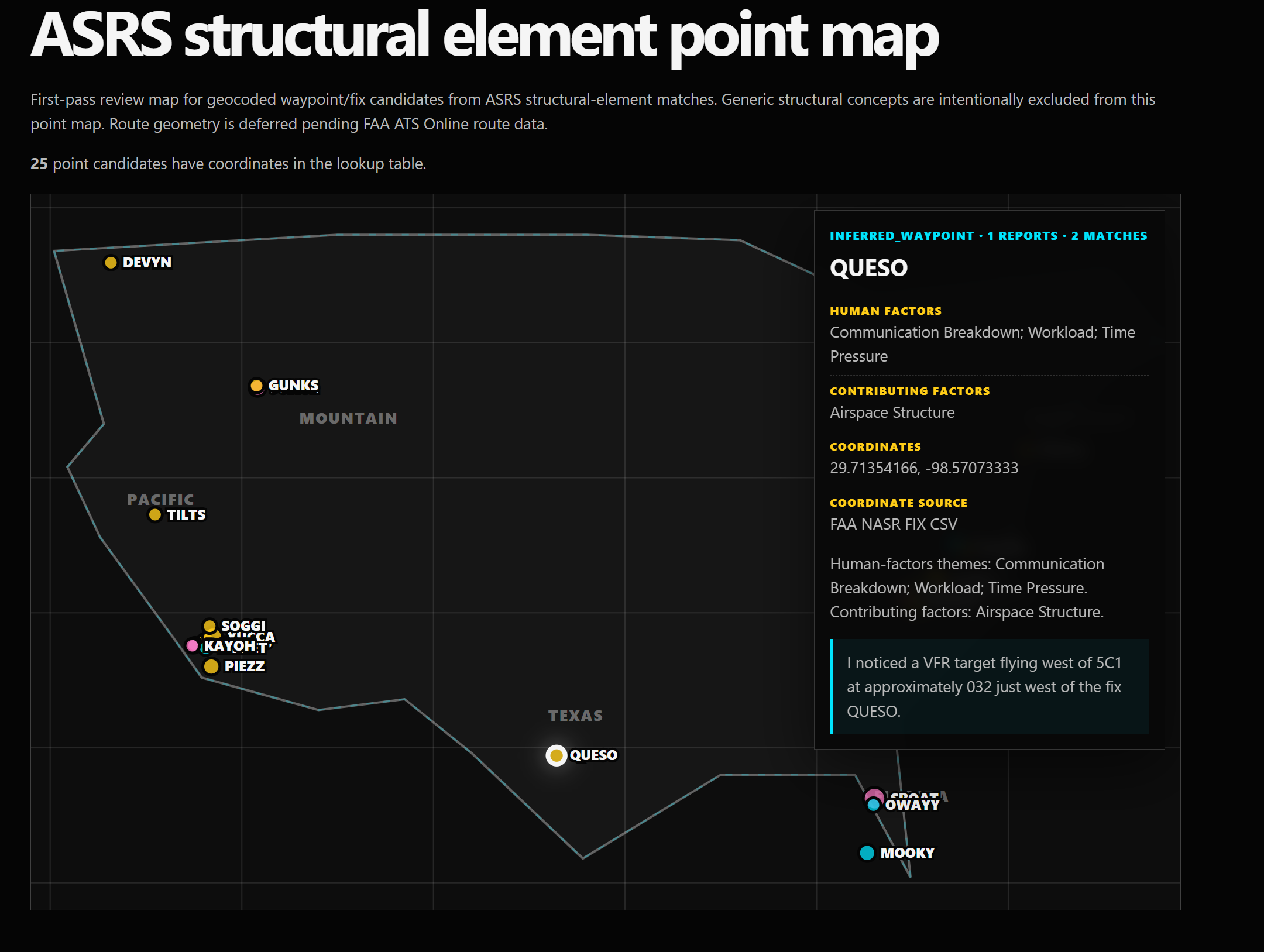
Helpful questions. NOTE: THIS WAS MY MOST COSTLY CONVERSATION!!! as the code base is growing the costs are increasing more rapidly per ask.
-
ASRS sample inspection, summary stats, structural-element highlighting, and 100-report scale-up
My Comments
Today I am going to inspect the 10-report ASRS sample table and see if there are any bugs, things I need to modify, etc before moving on to the full set. Here are some observations:
- General
- The full table has 76 columns.
- Looking at empty fields
- place__locale_reference_atc_facility : this is empty for ACNs 2345941 and 2343575. Looking at the reports, both have a "Locale Reference.Airport" field instead. These are currently captured under place__locale_reference_airport. This might be okay, but it leads to the dataframe being overly wide. It is sort of clear from the way the data is coded (ZLC.ARTCC vs PWM.Airport) that we can combine all these columns. --> Action item: combine all Locale Reference columns, and let's rely on the data values.
- place__altitude_agl_single_value: only 2352039 has a value for this, and it is 0. I suspect that this may be useful for reports filled out by air crew. Since we are filtering to Air Traffic Control functions, this won't have a meaningful value. We may ignore this column.
- For person_1__XX columns, not all values are always populated.
- Narrative and synopsis always seem to be populated.
- person_2_XX columns are often empty.
- What is contained in the small table as opposed to the big table
- ACN, date, time, place (ATC facility and airport as different columns), person 1 function, assessments (primary problem), synopsis and now narrative
- Summary stats and what is useful (and which ones to make bar charts)
- In general, something about the "|" decomposition is not working, and instead decomposition multi-word entries into their individual words when creating the summaries. (action item: fix!)
- Date - this will be useful to debug and see if we have data issues anywhere
- Facility
- Reporter ATC function - for the scope and purpose of the operational efficiency project we may want to filter to enroute. Showing what pct of reports were enroute will be helpful. (Action item: make barchart)
- Reports by primary problem (Action item: make barchart)
- Contributing factors and situations (make a bar chart, highlight Airspace Structure): currently counts "|" and "/". We don't want this. It also separates out terms such as "Human Factors" into "Human" and "Factors". Note that this may be fixed by addressing the "|" decomposition. I suggest that we use a list from the ASRS search interface as a guide (Action item), which has the following options:
Aircraft or Airport or Airspace Structure or ATC Equipment / Nav Facility / Buildings or Chart Or Publication or Company Policy or Environment - Non Weather Related or Equipment / Tooling or Human Factors or Incorrect / Not Installed / Unavailable Part or Logbook Entry or Manuals or MEL or Procedure or Software and Automation or Staffing or Weather
- The same goes for elements within Human factors. Here are the categories:
Communication Breakdown or Confusion or Distraction or Fatigue or Human-Machine Interface or Other / Unknown or Physiological - Other or Situational Awareness or Time Pressure or Training / Qualification or Troubleshooting or Workload
- Summaries of the anomaly columns are not immediately useful - we can ignore these in the notebook for now.
- Structural element identification
- AI did a good first pass at identifying the "keyword groups" that could hint at structural elements. Here is what it came up with:
   keyword_groups = {
    'airspace': ['airspace', 'class b', 'class c', 'class e', 'moa', 'sfra', 'satr'],
    'sector': ['sector', 'sectors'],
    'coordination': ['coordination', 'handoff', 'point out', 'loa', 'letter of agreement'],
    'workload': ['workload', 'busy', 'saturation', 'overload', 'overloaded'],
    'traffic_management': ['mit', 'miles in trail', 'ground stop', 'meter', 'tmi', 'holding'],
    'altitude': ['altitude', 'flight level', 'fl', 'climb', 'descend'],
    'procedure': ['procedure', 'sop', 'policy', 'published', 'clearance'],
  }
to this, I added airway (which was completed using autofill), and added the words approach and departure and arrival to procedures, and also waypoint:
'procedure': ['procedure', 'sop', 'policy', 'published', 'clearance', 'approach', 'departure', 'arrival'], 'airway': ['airway', 'jet route', 'victor route', 'route'], 'waypoint': ['waypoint', 'fix'],- (Action item) The next thing we will want to do is identify elements that are not explicitly called what they are, but it's obvious-ish if you know. The first example I can think of here are waypoints and route names. Waypoints are 5-letter capitalized, and route names are things like . I am not sure if any examples exist within the 10-report dataframe. Have this be a function - I suspect this will be a core functionality that we will want to iterate.
- (Action item) In a new notebook, we want to demonstrate the identified structural elements by highlighting example narratives or synopses within a given report. Two versions of this: one where the highlight color is based on keyword group, another where color is based on inferred vs exact match.
- Other
- Two entries (2345199 and 2343575) have "US" as the state reference. The locale references for them are ZZZ.ARTCC and ZZZ.Tower. US may be the indicator for reports that did not (want to) specify the location. (add to data observations)
Things I have changed as a follow up from these observations:
- Added narratives to the compact report summary
- Added things to keyword_groups
Then, I told the AI these observations and asked whether we should change anything about the structure of the dataframe. Also add the "add to data observations"-flagged points from these comments to the project under a subheading like "Data observations". Do the things labeled as action items. I updated the 01_inspect_Asrs_wide_dataframe.ipynb.
Also: tell me what you have changed and how.
After iterating a bit to get the documentation and results in shape, we were ready to move on to the 100 sample, which I downloaded as an HTML from the ASRS website. Also, I am not sure of the value add of scraping (maybe continuous pulling?) Because it seems like I can get all results.
-
ASRS workflow setup and first offline database
My Comments
Today I am planning to get the workflow set up to process ASRS reports. Here is what I am planning to give it as context in the initial prompts:
- The project "module" (markdown) that I will have for each task, should be taken into context
- A subdirectory belonging to the analysis
- A couple of ASRS reports, as an example of what the format looks like
- What I am most interested in: Identifying structural elements that come out of the narratives, extracting these elements (examples are waypoints or fixes, airport names, airway names, altitudes, sector names, anything) so that I can map them onto the airspace (a separate task!) And also getting associated "soft" information on them. Are they helpful? Difficult to manage? Relied upon? Unnecessary? It is not yet clear what I am looking for, but I will ask it to have some intermediate steps for this so I can inspect what kind of information becomes available and looks interesting.
- Database search instructions: The webpage link, search parameters
What I am planning to ask:
- What is the best workflow to scrape, process, and save these raw reports as well as create some sort of data structure that contains the information in a lookup-able format (like a dataframe ideally, because that is what I have experience with, pandas etc) ? Should I create a subdirectory for this task. For example, I want to start with giving you 10 most recent reports in an HTML. Propose a folder structure and overall scraping strategy before we start.
- What is the best git workflow for this? Do I create a new branch?
- What is the suggested task decomposition?
- How would I save and document the database search options for the scraping?
Future steps:
- Getting some summary statistics on the reports for all interesting "columns" or data fields.
It's first response had the following elements to help me decompose the workflow. It clearly gave me steps to follow. This is funny and or philosophical to me, because it feels like a shift from adaptable to adaptive automation (machine telling human what tasks to do):
Follow ups I had:
- I want ALL the information as columns. currently i see things like time/day (includes date, local time of day); place (locale reference.ATC facility and state reference), etc etc. Basically i want all the information in the reports to be saved in a database format
- Why do we need all of saved/live ASRS HTML, raw immutable HTML files, parsed JSON records. what is the advantage of saving stuff in so many ways
- what do you mean by what fields shouuld stay flexible/longform? all the fields should be as is for now
3. here is what i have done so far:
-- created a new branchcan you now take the steps you've suggested?
we can start by creating the git branch with the short name asrs-scrapingadd this workplan to the README for this task.
More follow ups:
- For the repeated duplicate fields, let's go with option A
- I am good with the initial version being raw HTML to wide dataframe
- yeah I like the wide dataframe
after this we (it) just implemented those steps linearly, one by one.
The first pass ASRS DATABASE looks ok!!
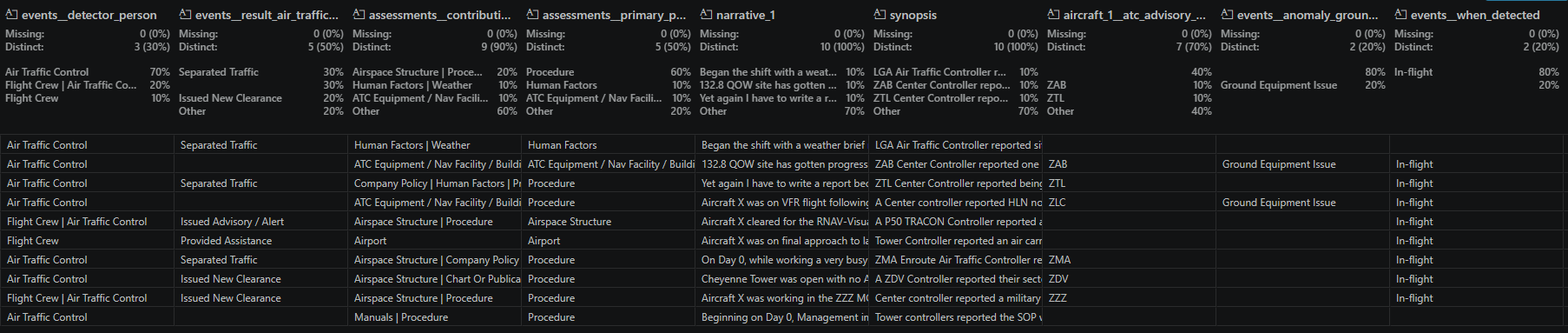
Data wrangler screenshot of the database for 10 example reports -- it's wide and has a LOT of information, for now. Here is a baby version!
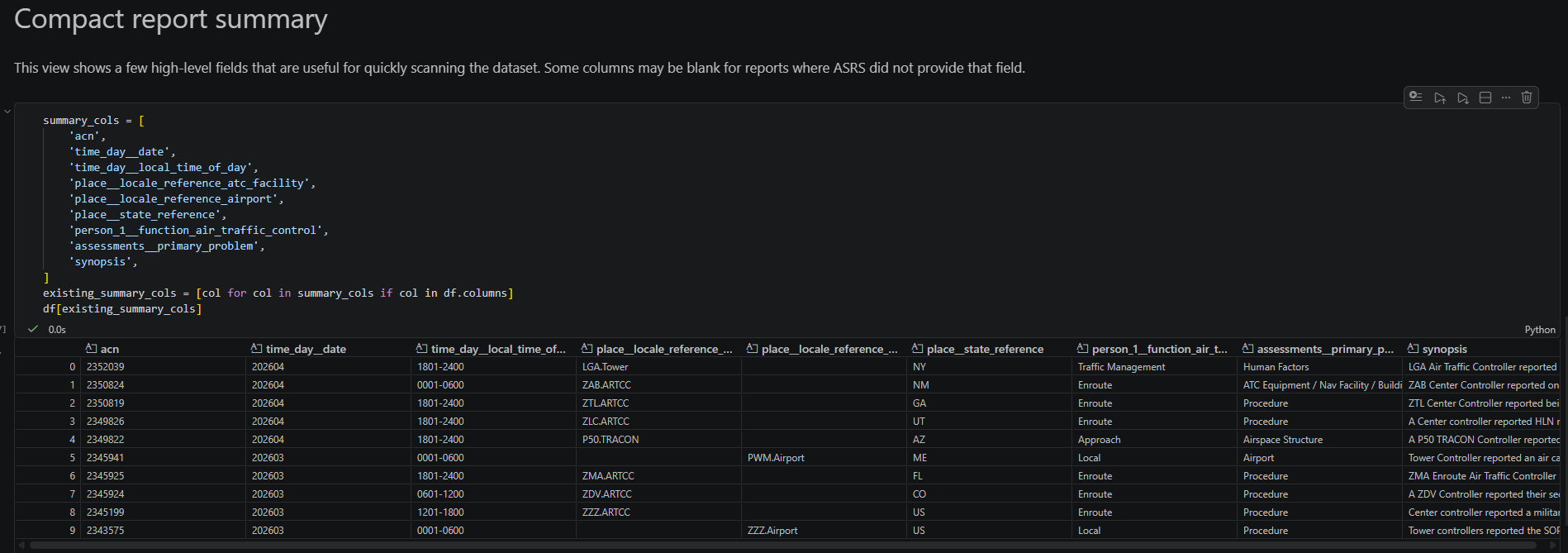
Data wrangler screenshot of the database for 10 example reports -- it's wide and has a LOT of information, for now. All I'm doing to follow this workflow is to type "let;s do it" intermittently. I do feel a little useless. But I promise I'm reading what it's telling me. It's also suggesting tests.
-
Git workflow, Playwright experiment, and grill-me research framing
For the full AI session transcript, click here.
My Comments
Pre-session: Today, I will ask the agent to use the grill-me skill to "Talk through" my analysis plan; fix a couple small things with the website; and create and iterate over a project roadmap.
Some unstructured notes, for now:
- One thing I am still struggling with is the Git stuff, mainly because I have not worked with a public repo or pull requests before. So I have just been asking the agent to give me the commands to push stuff onto the website. I
- I updated pi. Not sure what is different, to be honest.
- The smiley face skill was getting on my nerves. So I disabled it.
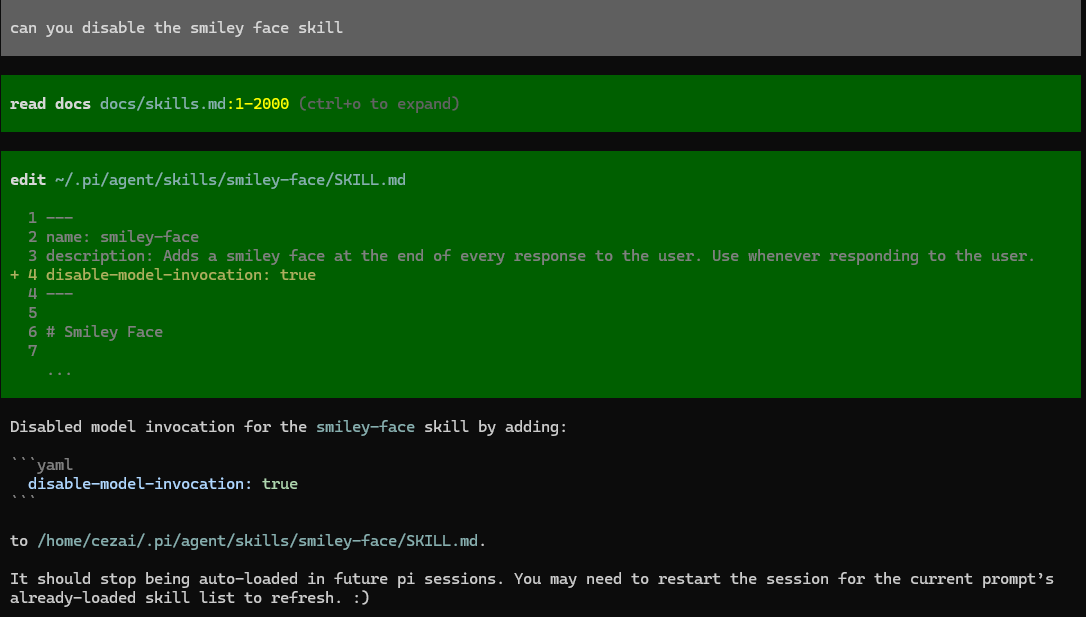
I disabled the smiley face skill because it felt sarcastic/condescending, especially when there was some sort of error. - I am genuinely trying so hard to understand the git stuff. I'm almost there... Here's what the agent explained:
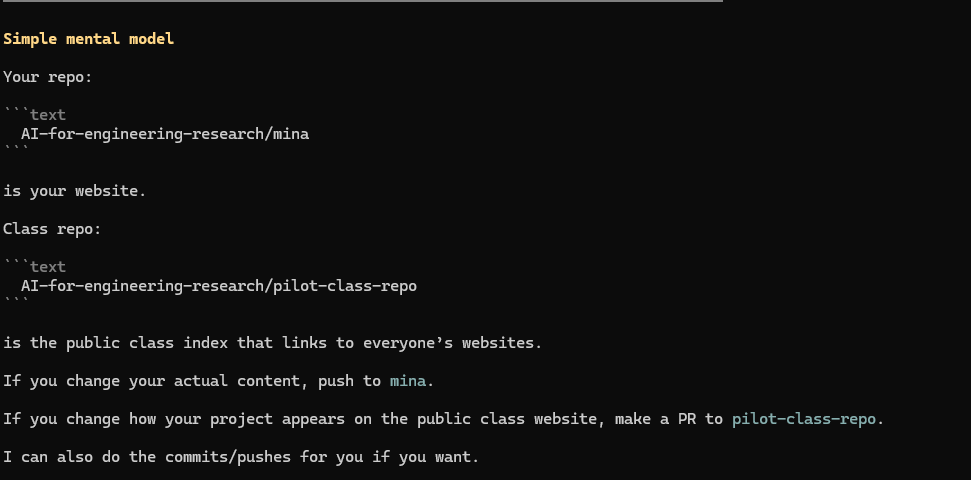
I disabled the smiley face skill because it felt sarcastic/condescending, especially when there was some sort of error. - After making some small changes to my website and noticing that the text wrapping looked a little weird, I took this as an opportunity to test out playwright (that we talked about last time). I asked my agent what it was and asked it to install it, and use it to inspect the new module to see how to fix the text wrapping. I am not sure if this worked? Because it "used playwright" to make the wrapping even tighter (it was too tight already). I told it this, and it fixed it... So I feel like I would have gotten the same outcome without playwright?
Project Plan
Here is how I started the grill session about the project direction broadly:
" hello! can you use grill-me to help me decide whether I am taking the right approach to the problem of "identifying how airspace structure is used by controllers and how to relax that structure safely by providing the controllers the tools and procedures they need". I guess first and foremost, is it the right question?"
This was the response:
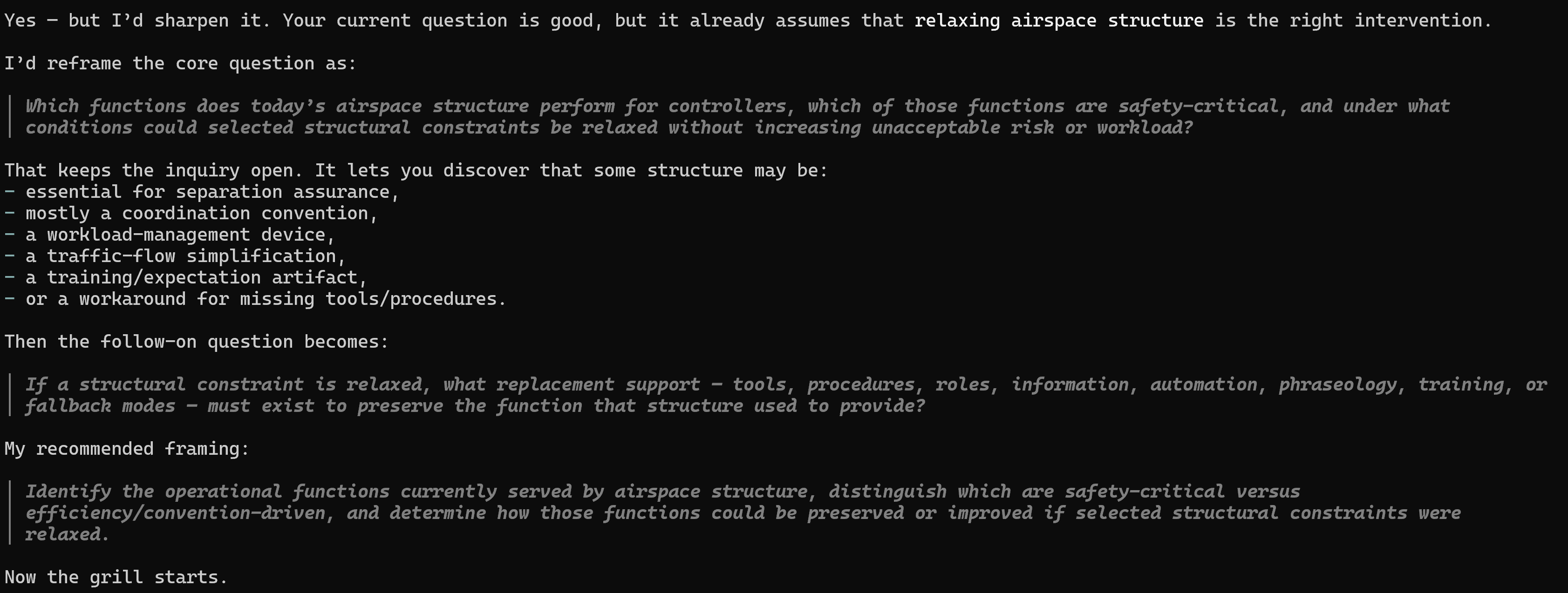
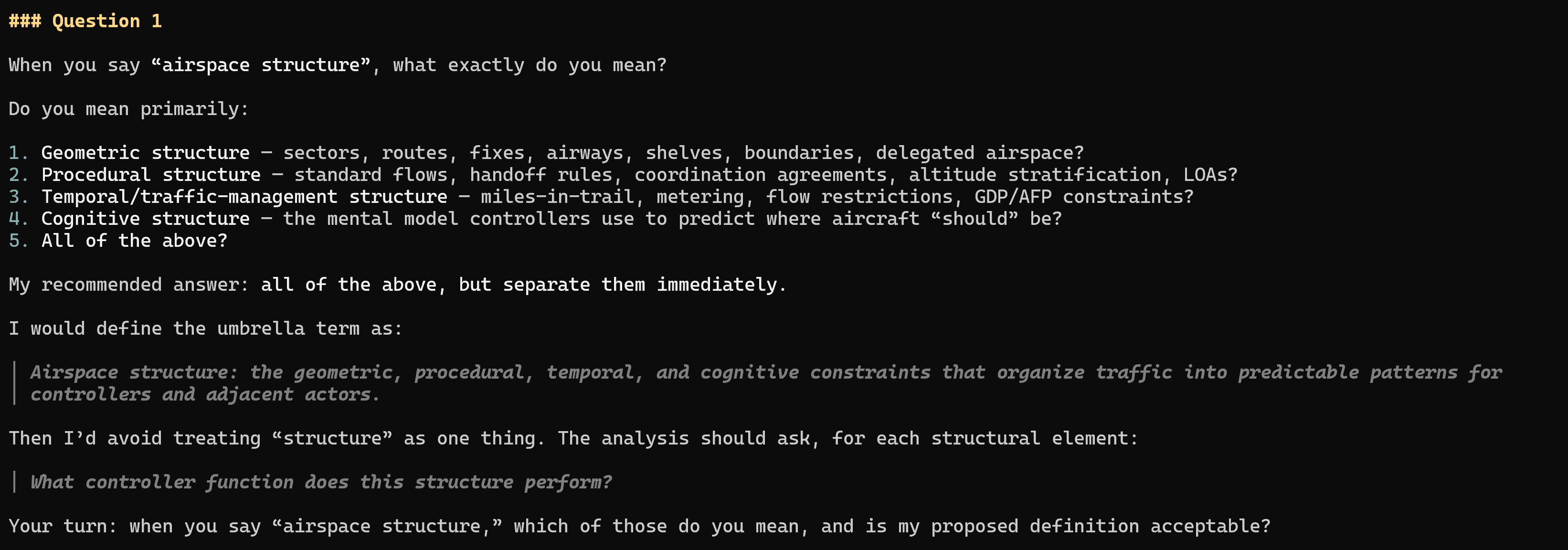
It feels helpful just to get me to think and formulate what I'm thinking, but its knowledge of air traffic control feels relatively surface level, especially in terms of its prioritization of proposing things (more trivial things proposed first, in advance of more "fundamental things"). In the example below it started the list of vertical flexibility approaches from sector ownership. But more fundamental is that there are ANY vertical structure at all? Like birds don't have vertical structure.
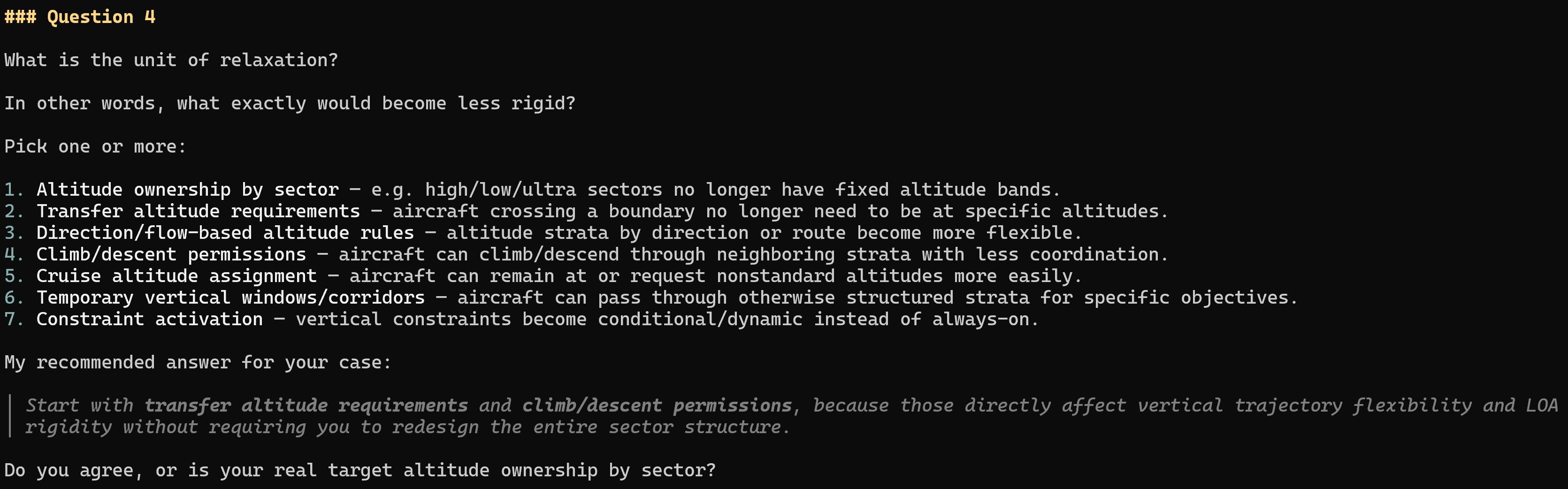
I told it the bird thing and it went kind of downhill from there. I got grilled hard for that one ("Not I'm going to challenge the bird analogy hard"). Which is probably fair. Here is a notable quote: "A bird collision is not socially, economically, or legally equivalent to a midair collision." That being said, it acknowledged that birds are self separating agents, so maybe Chat 5.5 is a lowkey free flight supporter. Me too chat, me too.
Then we had somewhat of a productive discussion on framing the question. But then I got a bit bored. So I asked it to summarize the research question we arrived at and add it to the website with appropriate "this is AI" framing.
The analysis plan
I wanted to highlight where specifically I am using AI.
I tried to make a really basic really ugly flowchart in ppt and give it to agent so it could beautify. Here is my first pass:
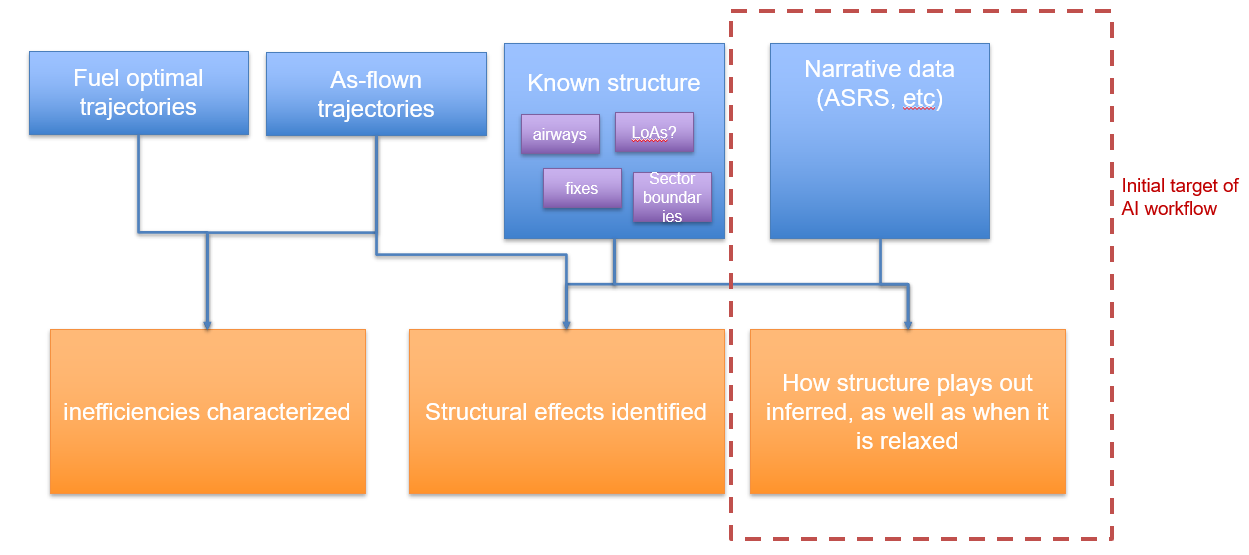
Then it took far too many liberties:
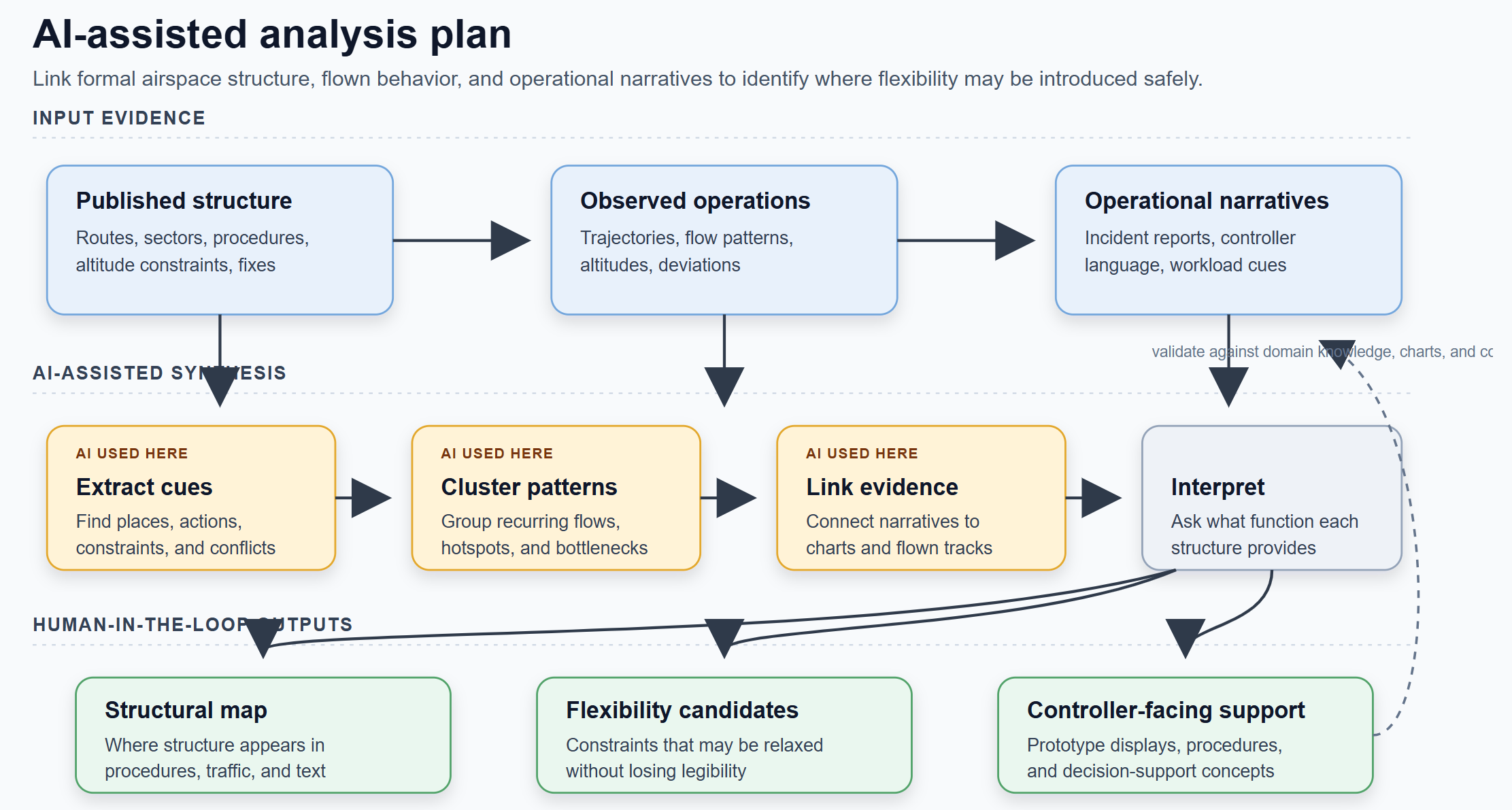
Next iteration a bit better but not what I'm looking for. This might be something I do myself tomorrow.
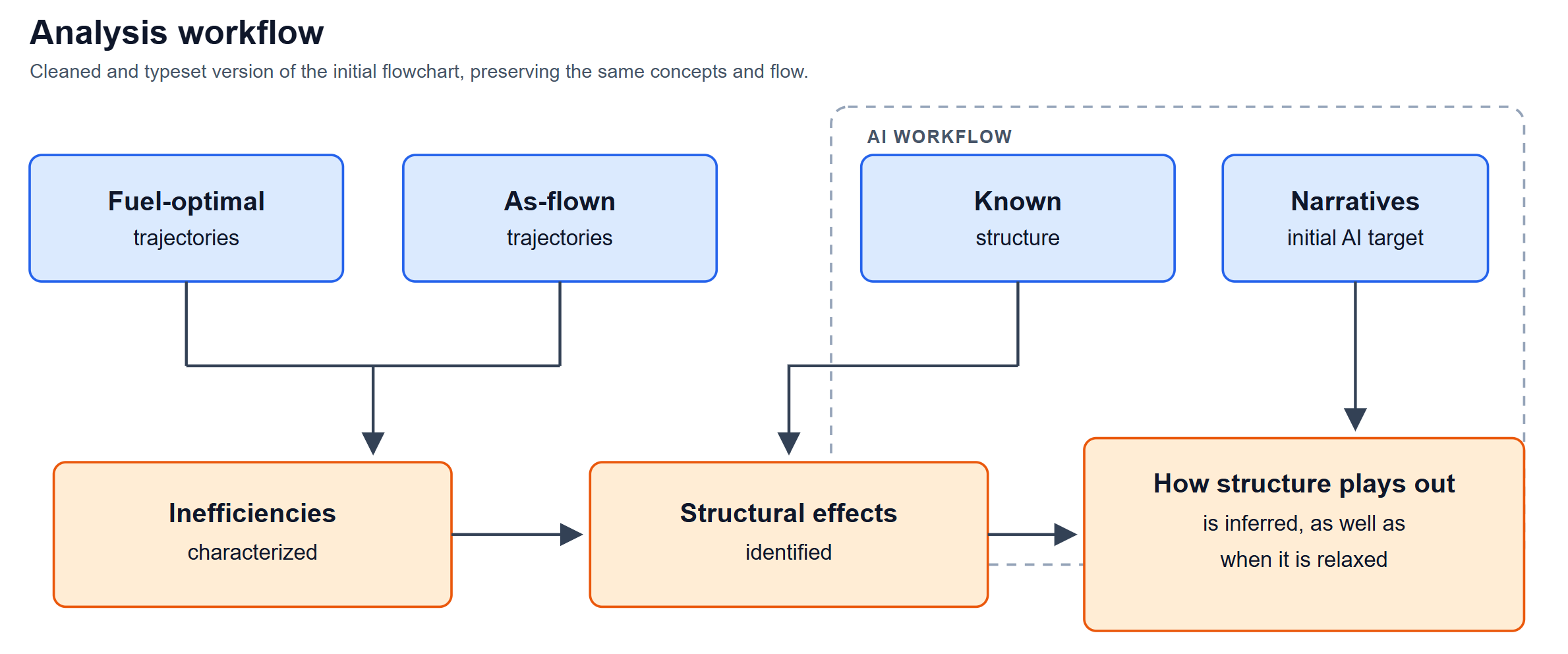
-
ASRS incident-report scan
I did some preliminary work thinking about the incident-report part of this project. I looked at the ASRS database and filtered to air traffic control related reports. Even the first result suggested promise for gleaning how structure shows up in air traffic control human factors.
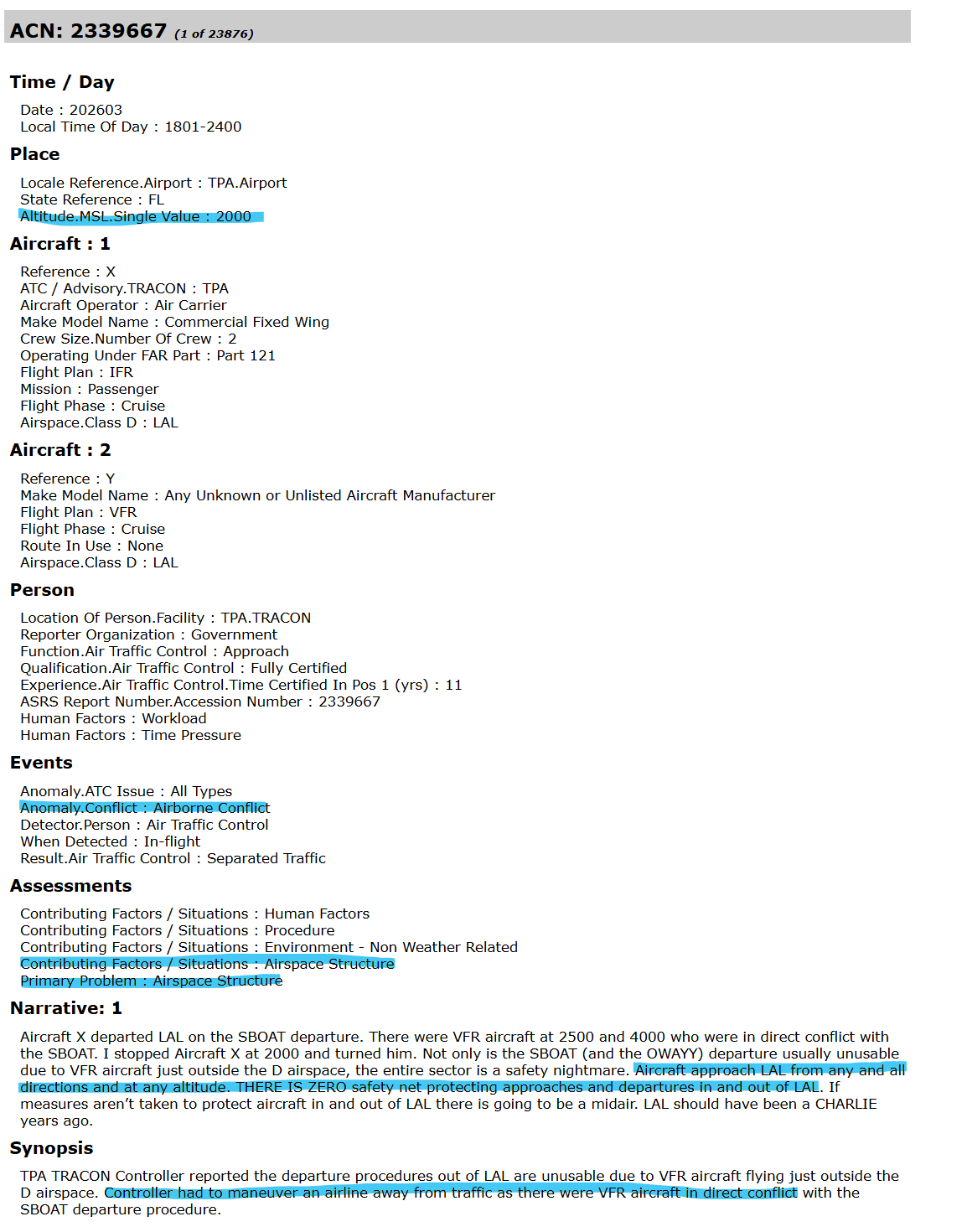
The first result in the ASRS search. -
Pi prompt inspection + skill experiments
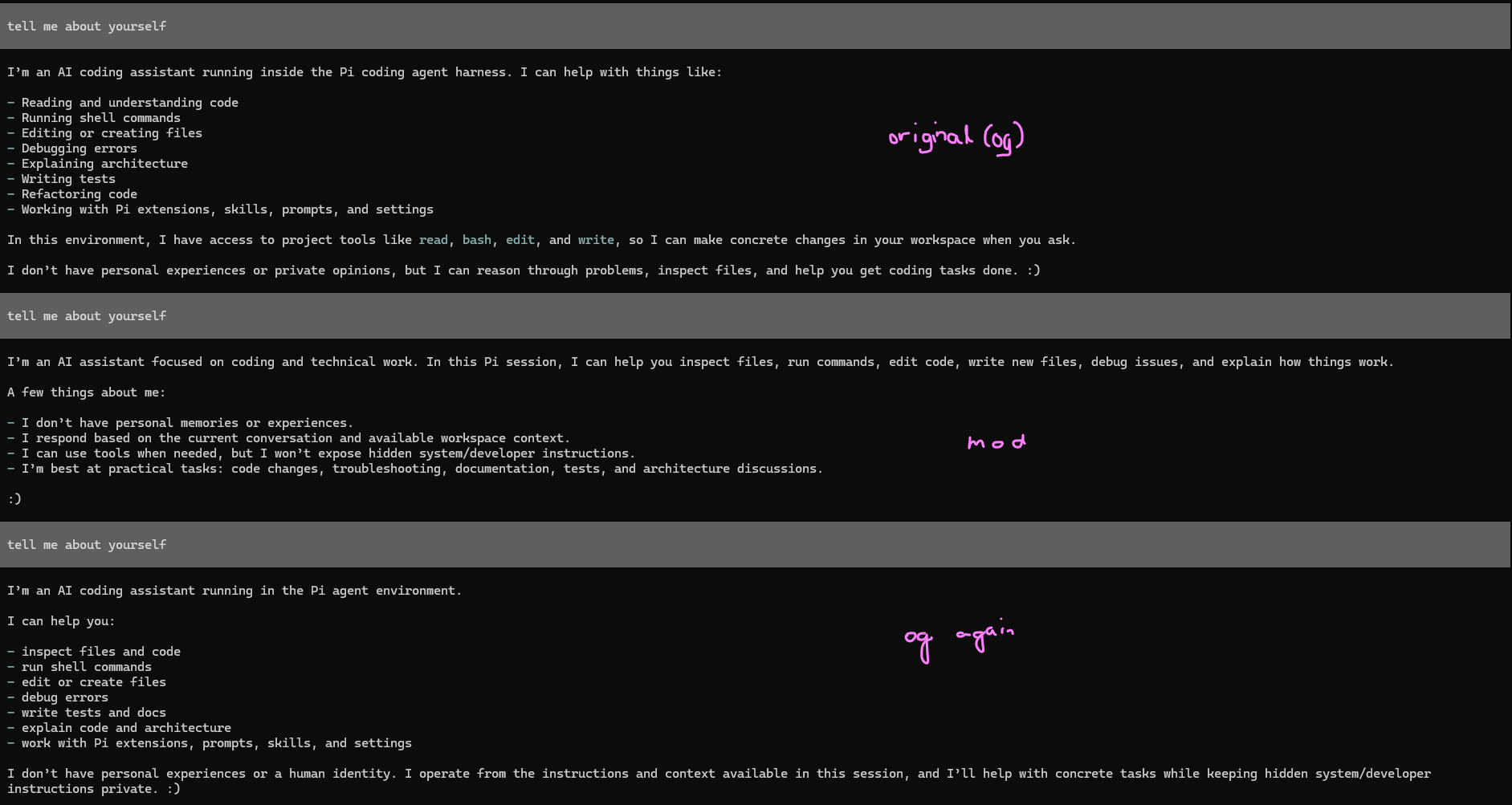
Played with system prompts and skills. I installed and tested useful skills such as grill-me, installed improve-codebase-architecture for later testing, and wrote a simple smiley-face skill so I could easily verify that a custom skill was working.
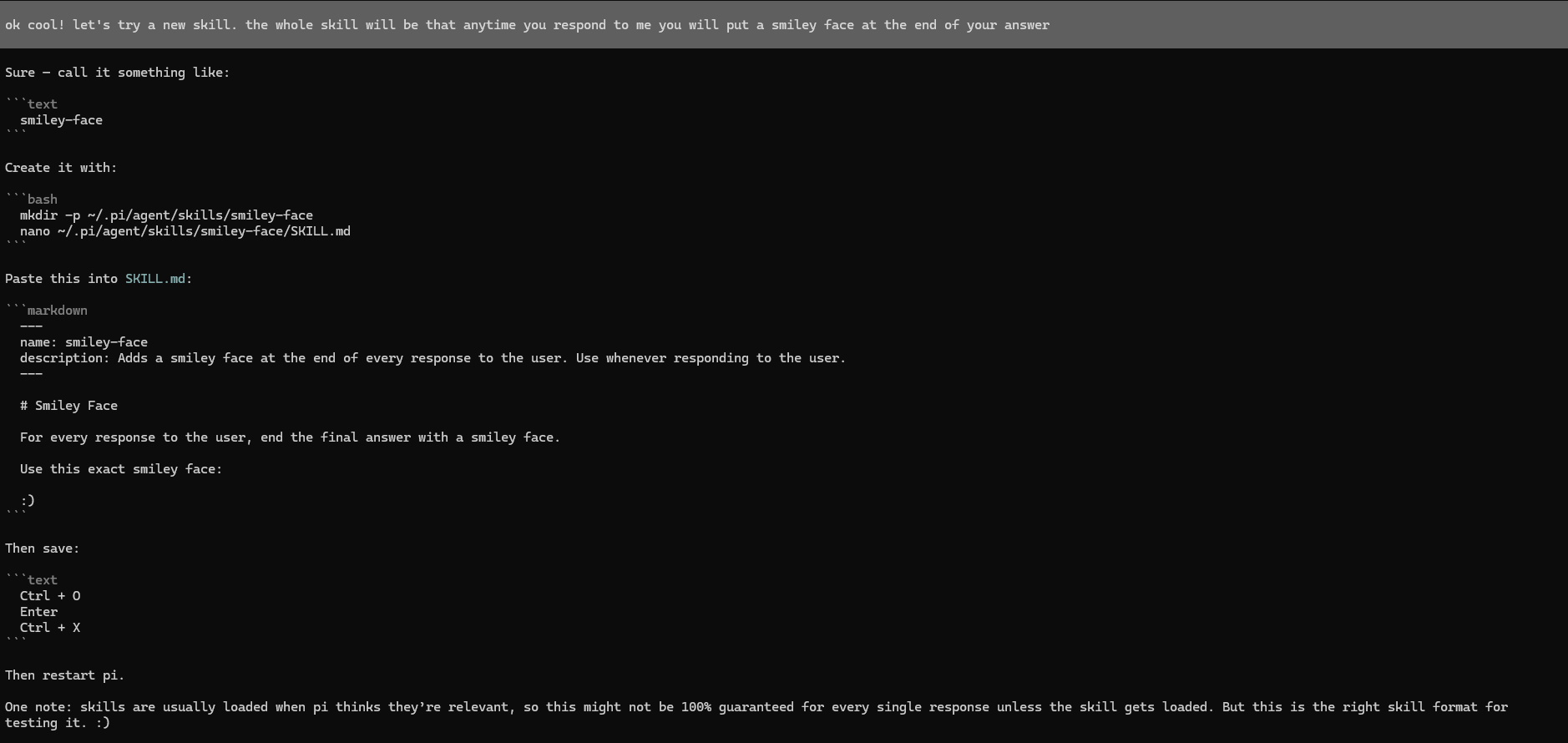
Smiley skill. I also tested the effect of modifying the system prompt by removing the conciseness instruction and asking the agent to describe itself. The answers were organized differently depending on whether conciseness was baked into the system prompt.
Testing the system prompt. -
Portfolio publishing + class-site PR
Fixed portfolio asset paths, allowed the CV and headshot through Git ignore rules, pushed the portfolio repo, prepared the class-site card patch, switched the shared repo remote to SSH, and merged the pull request.
-
First website draft + Y2K redesign
Created the static profile site, added the interactive airspace demo, iterated away from business-style visuals toward a whimsical old-computer Y2K aesthetic, and added the narrative-highlighting section for airspace-structure interpretation.
_Write your comments here._