Some reflections on my workflow
There are three things I find myself saying all the time when talking to coding agents:
“Please commit the changes”
You have to use version control. Although the agents have mechanisms to step back to an earlier point in your conversation with them, you need to recognize that there are two parallel strands of events occurring at any time.
On the one hand, there’s your conversation with the agent, which you can
manage within the agent (in Pi, using things like /resume or, if you want
to get fancy, /tree).
On the other hand, there are changes to your code. If the agent makes a change, you talk about it a bit, you test it, then you decide you didn’t like that and you want the agent to revert the change, there is no guarantee that the agent will do that correctly. If you commit the change that the agent made to Git, then you can always deterministically roll that change back.
You always have to be aware that the behavior of the agents is to some extent stochastic. There is genuinely no guarantee that the instructions “Do X” followed by “Undo X” will get you back to your original state. Version control systems are deterministic. And you need that.
USE GIT!!!
“Please make a backlog issue/task to …”
Just like you, your agent needs a to-do list. In most research tasks, there are lots of steps that you need to do, sometimes depending on one another, sometimes little things, sometimes big things. Very often, the granularity of these tasks is too big for the agent to handle reliably in one go. (Emphasis on “reliably” because the biggest models are really good at one-shotting a lot of things, but it can be a little hit-and-miss.)
So you need some system to record that to-do list in a way that the agent can access and work from. There are three main options:
- Markdown files: this works pretty well for simple projects. You have some
instructions in your
AGENTS.mdthat tell the agent how to manage tasks by writing them into some files, you set up some conventions for marking when tasks are done, and off you go. It’s a little ad hoc, and you’re relying on the agent’s natural language understanding to interpret things, because the files won’t be very structured, but it can work. - GitHub issues: the agent can use the
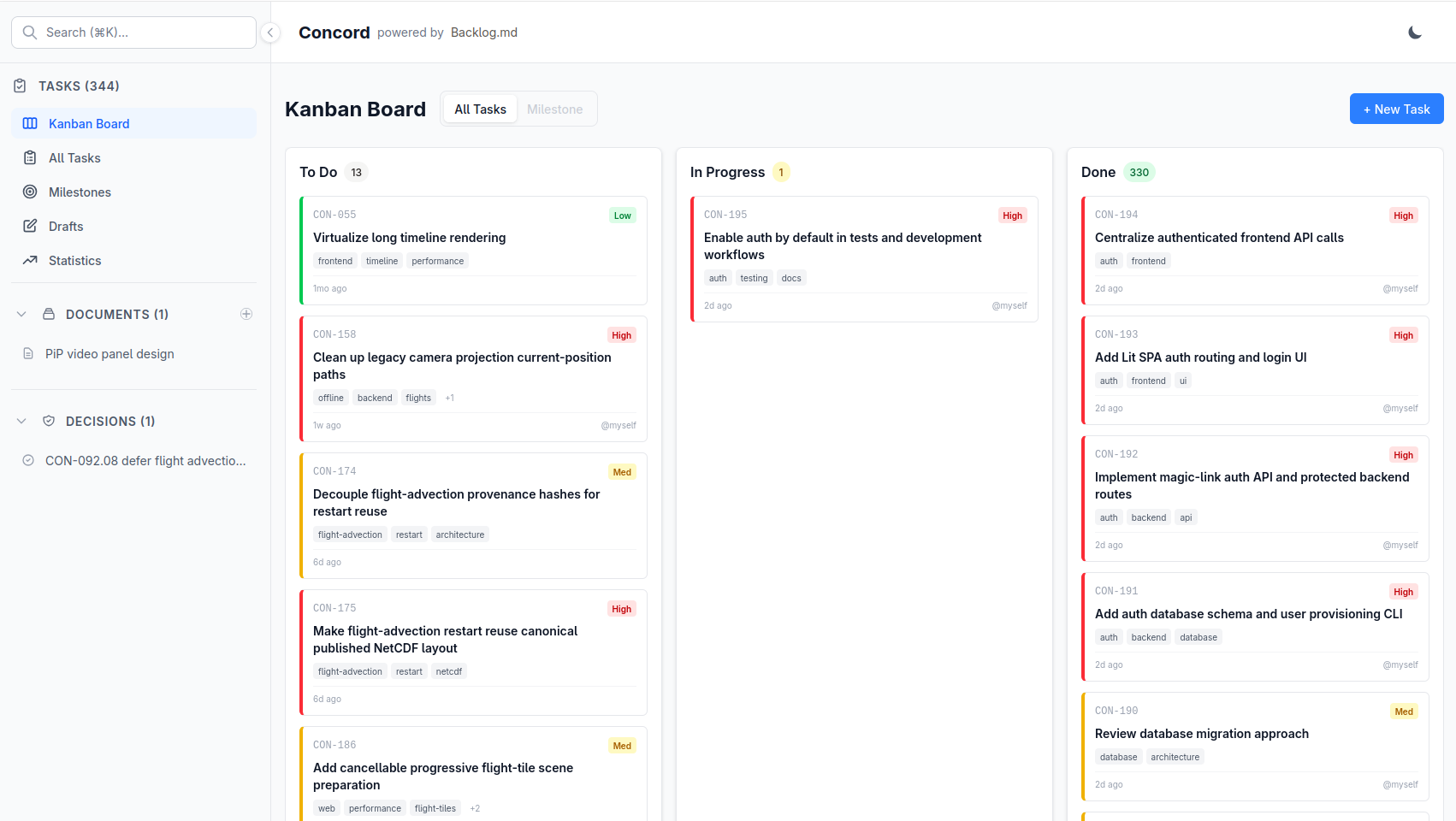
ghGitHub CLI to create and manage issues in your repository, and you can use that to organize tasks. “Make a GitHub issue to do X.” “Please start work on issue #123.” It works pretty well, but it’s quite heavy-weight, and it has the disadvantage of putting all of your agent’s task management on GitHub, which can end up being a lot of tasks. That can obscure real user-reported issues. - A local issue tracker: this is what I’m increasingly doing. Think of something like GitHub’s issue tracker, but it runs locally and records tasks in Markdown files, but Markdown files that are managed by the issue tracker in a fixed format. This makes it much easier for the agent to work with than unstructured Markdown, and it keeps your agent task organization separate from real “issues” in your repository. I like Backlog.md, which is easy to set up and has a nice Kanban board web interface.
“Please record that in the project documentation”
Coding agents by default have no inter-session memory. They wake up at the beginning of a session all bright-eyed and bushy-tailed, completely naive and innocent of the horrible things you’re going to make them do. You need a mechanism to inject some world-weary cynicism into your agent from the get-go.
How do you do that? There are fancier ways using databases of various kinds,
but agents really really l♥ve Markdown, so just give them what they
want. Have a docs directory and when the agent says something interesting or
useful that you’d like it to remember, ask it to save the insight into the
documentation.
To start with, you don’t need to go to town too much on organizing this. Just
put something in AGENTS.md to let the agent know where to find things, and
that’s enough to get started. Once you’ve accumulated a bit of documentation,
ask the agent to organize it itself. The magic words you want to use are
“progressive disclosure”. This means that your AGENTS.md will have a short
list of documentation files, divided by topic, so the agent knows where to go
to find information about, for example, how testing is done in this project,
or how a particular algorithm or data source is structured. This means that
the agent can find what it needs to know without needing to search through all
the documentation (slow and bad) or read it all into its context (worse).